
Vtuber Assistant
Overview
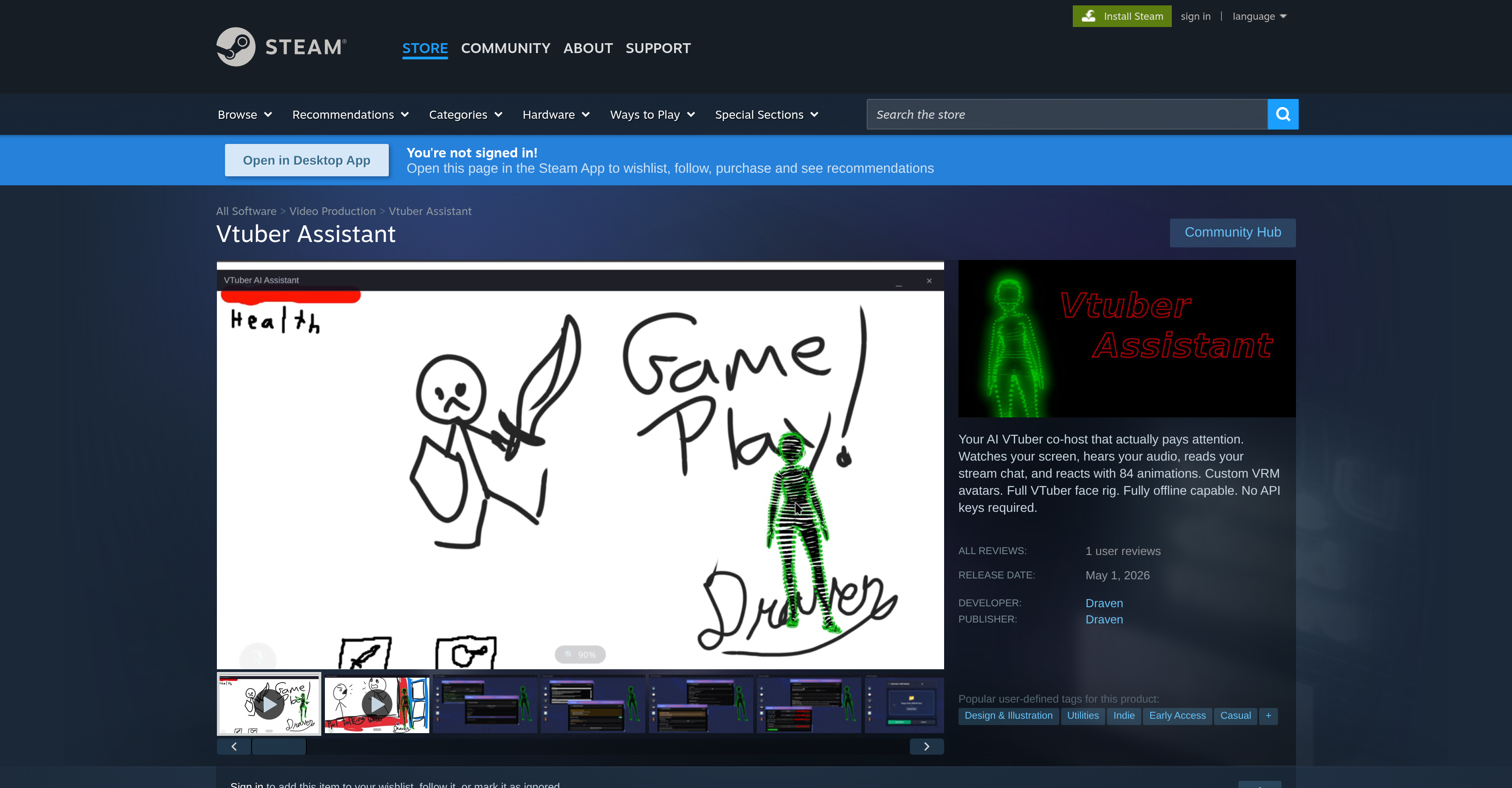
- Keep your audience engaged with real-time reactions to stream chat, audio, and on-screen events, powered by AI reactivity that selects from 84 pre-coded animations.
- Deliver a personalized streaming experience by importing your own custom VRM avatars with a full VTuber face rig for authentic facial tracking.
- Stream without interruption using full offline mode, where all AI responses, animations, and audio processing work without an internet connection.
- Skip complex setup with no API key required, simplifying integration so you can start streaming with your AI co-host immediately.
- Make your avatar truly yours by contributing custom animations to the library, shaping the tool's interactivity around your unique style.
- Ensure every interaction feels natural with contextual AI responses that interpret the meaning behind chat, audio, and on-screen events for relevant replies.
Pros & Cons
Pros
- Real-time response
- Interacts with on-screen events
- Responds to audio input
- Interacts with stream chats
- Pre-designed animations
- Fully rigged VTuber faces
- Utilizes custom VRM avatars
- Offline use possible
- No API key required
- User-friendly
- Highly customizable
- Promotes interactive audience engagement
- Contribution option for animation library
- Ongoing improvements
- Accessible during development stage
- Actively relies on community feedback
- Interprets audio, visuals, text
- 84 animations available
- Desktop overlay option
- Resizable positioning
- Contextual synthesis
- Advanced TTS/STT integrations
- User-controlled facial tracking
- Toggle between different modes
- Modular pluggable system
- Full UI localization in multiple languages
- Dual avatar system
- TTS voice output
- Visual screen capture capabilities
- Full feature-complete on launch
- Better onboarding for beginners
- Performance improvements for different operating systems
- Facilitates user suggestions and feedback
- Responsive voice-enabled avatar
- Observes user's screen activities
- Reads Twitch or YouTube Live chat
- Avatar models are customizable
- Beginner-friendly VTuber rig
- No account creation necessary
- Multiple character presets
- Fully offline capable
- Automatic animation selection based on emotion
- Live memory editor
- Donation and sub callouts
- Multilingual support
Cons
- No API key requirement
- Limited to VRM avatars
- Limited animations
- Early Access stage
- Limited languages support
- Possible privacy issues
- Depends on user contributions
- No price information
- Unclear offline capabilities
- Single developer risks
Reviews
Rate this tool
Loading reviews...
❓ Frequently Asked Questions
Vtuber Assistant is an advanced tool specifically designed for VTubers to serve as a virtual co-host. It functions to elevate the live streaming experience by generating real-time responses to on-screen events, the audio input, and stream chats. Vtuber Assistant employs AI technologies and offers features such as fully rigged VTuber faces and the capacity to use custom VRM avatars.
Vtuber Assistant enhances the live streaming experience by employing artificial intelligence to generate real-time reactions to on-screen occurrences, audio input, and stream chats. This capability brings a dynamic level of interaction to the ongoing stream, promoting an engaging and unique live streaming experience for the audience.
Vtuber Assistant comes with numerous pre-designed animations. These animations are dynamically interactive and respond in real-time to the ongoing stream, greatly enhancing the viewer's experience.
Vtuber Assistant's key features include fully rigged VTuber faces, the usage of custom VRM avatars, AI-enhanced real-time responses to on-screen events, audio input, and stream chats. It also offers the flexibility for use both online and offline without necessitating an API key. The tool is customizable and user-friendly, facilitating a more engaging streaming experience. It also features an animation library and allows deeper AI integration for a more contextual understanding and response.
Yes, Vtuber Assistant is designed to offer various customization options. It features the ability to use custom VRM avatars and fully rigged VTuber faces. Additionally, users are allowed to contribute to the tool's animation library and opt for more profound AI integration for more context-aware and understanding responses.
Yes, Vtuber Assistant supports the use of custom VRM avatars, adding to its versatility and user-friendliness. This feature allows VTubers to truly make their streams unique and personalized.
Contrary to many other similar tools, Vtuber Assistant is not solely limited to online usage. The software can also be used in offline mode, enabling continuous operation irrespective of internet availability.
The animation library in Vtuber Assistant serves as a repository of numerous pre-designed animations. This facility greatly enriches the interactivity of the stream as these animations can dynamically react to the ongoing stream. Furthermore, the software allows its users to contribute to this library, fostering a community-driven development approach.
Vtuber Assistant capitalizes on AI technologies to provide beneficial features like artificial intelligence reactivity. This means the software can respond in real-time to the stream chat, on-screen events, and audio input. The AI also provides the capacity for a more contextual and understanding response through deep AI integration.
Users can meaningfully contribute to Vtuber Assistant's development by providing their feedback and suggestions. The software is in its Early Access stage, and continuous improvements and features are implemented based on community feedback and the app's development progression.
Yes, one of the noteworthy features of Vtuber Assistant is its ability to be used in offline mode. This means that usage of the software is not dependent on internet availability, thereby enhancing its accessibility and continuous operation capability.
Vtuber Assistant is designed to require no API key for both its online and offline usage. This feature enhances the ease of use and user-friendliness of the software.
To integrate Vtuber Assistant into live streams, simply set it up as a virtual co-host. The software then monitors the live stream in real-time, responding to on-screen events, audio inputs, and stream chats dynamically, thereby creating an engaging and interactive streaming experience.
Yes, Vtuber Assistant is designed to be user-friendly. It provides fully customizable options and no requirement for an API key, both of which contribute to making the setup and usage process straightforward and hassle-free.
Currently, Vtuber Assistant is in the Early Access stage. While it is already functional with robust features, it's still undergoing constant improvements and updates based on community feedback and developmental progression.
The term 'Contextual AI Response' in Vtuber Assistant refers to the software's capacity to generate responses that take into account the overall context of the stream. The AI integration in the tool allows it to understand and react to various inputs, including audio, on-screen events, and stream chats in a contextual manner, making the responses relevant and meaningful.
Yes, Vtuber Assistant can interact with the user's stream chat in real-time. It reads the stream chats and generates dynamic responses, thereby contributing to an engaging and lively streaming experience.
Vtuber Assistant is designed with the unique feature of responding in real-time to on-screen events. This is achieved through AI-enhanced technologies that track the stream and react accordingly, creating an interactive and lively streaming environment.
As Vtuber Assistant is in the Early Access stage, users can expect ongoing improvements and feature additions to the software. These updates will be based on community feedback and the software's development progression. However, specific future updates are not specified directly on their website.
Yes, Vtuber Assistant is available for purchase and download on the Steam platform.
Vtuber Assistant is an advanced virtual co-host tool specifically designed for VTubers. It provides a unique, engaging, and interactive live streaming experience by responding in real-time to the on-screen events, the audio input, and the stream chats.
Vtuber Assistant enhances the live streaming experience through its real-time response system. It observes the streamer's screen, listens to the audio feed and scrutinizes the chat streams. As it makes these observations, the tool provides dynamic reactions, stimulating an interactive and immersive live streaming experience.
Artificial intelligence reactivity in Vtuber Assistant refers to its ability to dynamically respond to stimuli during a live stream. It reacts in real-time to on-screen events, the audio input, and stream chats, thereby creating a reactive and engaging atmosphere.
The pre-designed animations in Vtuber Assistant play a crucial role in making the live stream more lively and interactive. They react dynamically with the ongoing stream creating a virtual environment that is responsive and engaging.
Vtuber Assistant utilizes custom VRM avatars by allowing the users to import and use their customized VRM avatar models. These models are then fully rigged and used in the live stream, enhancing the personalization aspect of the streaming experience.
Vtuber Assistant is highly customizable. Its features include fully rigged VTuber faces, custom VRM avatars, user-contributable animation enhancements, and text-to-speech voice output. Users can tailor these elements to create a live streaming experience that best suits their needs and appealed directly to their audience.
Yes, Vtuber Assistant can be used offline. All its features including AI reactivity, audio input response, and animation display work efficiently offline, with no requirement of internet connection.
No, an API key is not required to use Vtuber Assistant. This feature simplifies the user experience by obviating the need for additional configuration steps commonly associated with API key usage.
The Early Access stage means that Vtuber Assistant is still in its development phase. Improvements and additional features are continually being developed and incorporated based on the feedback from the user community and the development team's progression. Users of the software during this stage can expect updates and enhancements that refine and expand the software capabilities.
Yes, Vtuber Assistant offers users the ability to contribute to its animation library. Users can create and upload their unique animations, enhancing the tool's personalization and enriching the variety of available animations.
Deeper AI integration in Vtuber Assistant refers to the software's capability to understand and respond more contextually to incoming data. This means that the AI tool is designed to comprehend the context, interpret the intention, and respond in a way that's appropriate to the situation, thereby providing a more intelligent and meaningful interaction.
A 'more contextual and understanding response' means that Vtuber Assistant is designed to understand and respond based on the context of the conversation. It can interpret the meaning of inputs based on their context, enabling it to produce responses that maintain the stream's flow and contribute to a more natural and engaging interaction.
Vtuber Assistant is intended for virtual streamers, gaming enthusiasts, and users interested in virtual reality experiences. As it functions as a co-host for VTuber activities, it greatly enhances the interactivity, engagement, and uniqueness of live streaming experiences.
The essential features of Vtuber Assistant include AI reactivity, fully rigged VTuber faces, custom VRM avatars, real-time reactions, virtual reality streaming, screen capture, live system audio, artificial intelligence co-host, text-to-speech functionality, user customization, community feedback integration, offline functioning, and no API requirement.
Vtuber Assistant's facial tracking feature facilitates real-time tracking of the user's facial movements. This feature collaborates with the custom VRM avatars, enabling the avatars to mimic the user's facial expressions and movements, making the streaming experience more authentic and interactive.
Vtuber Assistant interacts with stream chats by scanning and interpreting the messages in real-time. Based on these interpretations, the AI can provide responses, engage with the audience, and even react with specific animations, promoting a more interactive stream chat.
Yes, you can bring your own custom avatars to use with Vtuber Assistant. You can import and use your customized VRM avatar models in the streaming experience. These models can be fully rigged and employed in the stream, enhancing the personalized touch in your stream.
During your streams, Vtuber Assistant can perform 84 different pre-coded animations. These include, but aren't limited to, expressions of happiness, anger, sadness, and actions such as dance. The AI chooses the appropriate animation based on the emotion or the context of the stream.
No, Vtuber Assistant does not require the internet to operate. It has an offline mode which allows all the key features to function efficiently without an internet connection. This includes AI reactivity, audio input response, and animation display.
Vtuber Assistant ensures user customization through features such as fully rigged VTuber faces, custom VRM avatars, user-contributable animation enhancements, and text-to-speech voice output. Users can tailor these elements to their preference, thereby creating a streaming experience that best suits their needs and appeals directly to their audience.
Pricing
Pricing model
Paid
Paid options from
$17
Billing frequency
One-time
Related Videos
Greeny the Pirate Co-host Roasts Gameplay and Sings a Shanty
Vtuber Assistant Plays LETSGO!!!•298 views•May 20, 2026