Overview
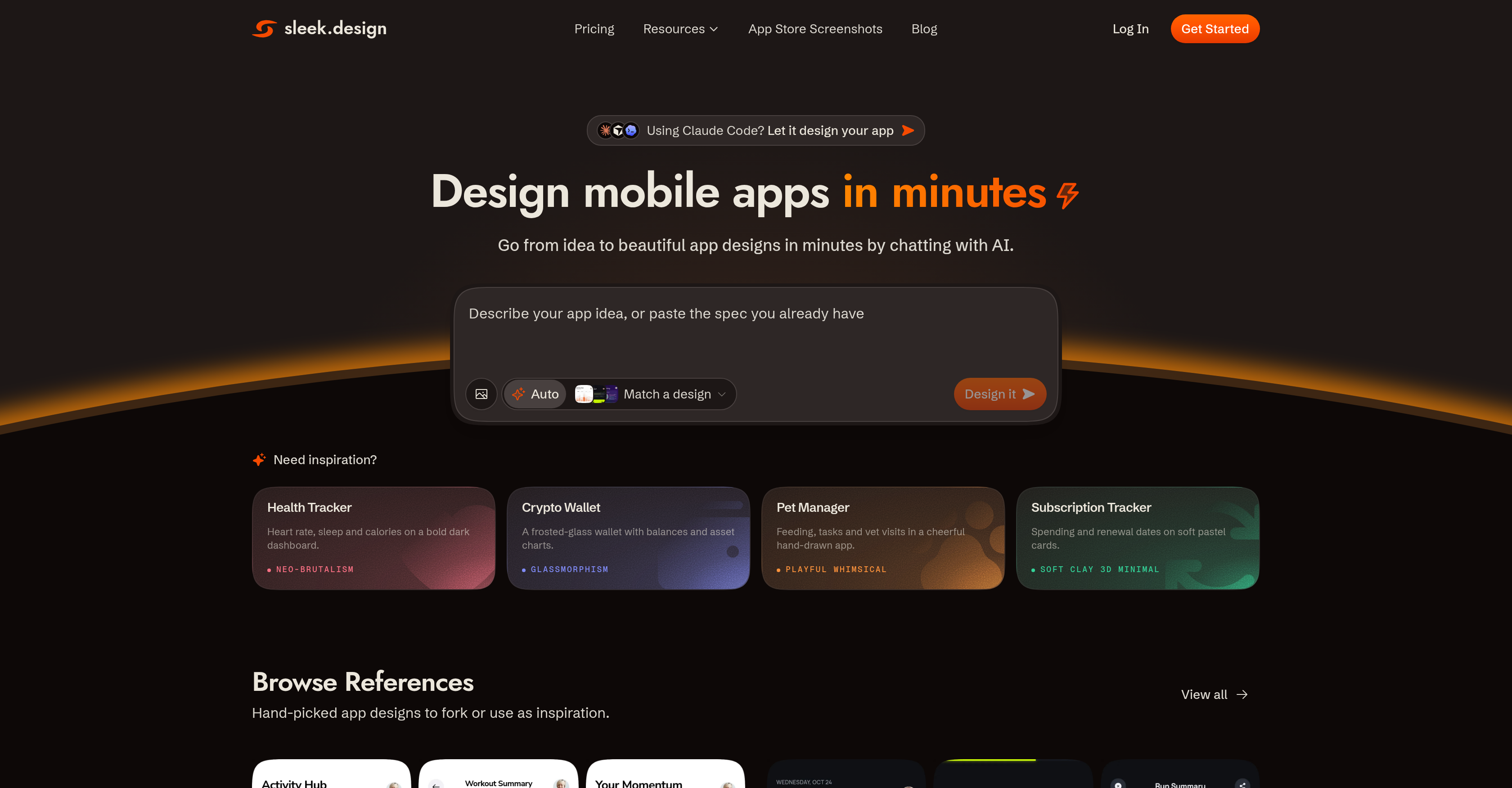
- Turn an app idea into a high-fidelity mobile app design in minutes by describing it in text or attaching a reference image, with no specialized design experience required
- Launch designs that feel native on both iOS and Android because every layout, component, and interaction pattern follows iOS Human Interface Guidelines and Material Design conventions, including native navigation, accurate device dimensions, and tap-target sizing
- Skip wireframes and initial sketches entirely by generating complete screens with layout, components, copy, and styling in a single pass, moving straight into rapid prototyping
- Refine any generated screen instantly with fully editable designs, iterating on layout, components, copy, and styling until the interface matches your exact app concept
- Hand off production-ready assets without redrawing anything by exporting designs to Figma or directly to code for development teams
- Start from proven patterns instead of a blank canvas using a library of hand-picked app design templates spanning fintech, social, e-commerce, productivity, wellness, and AI tools
- Automate the design stage of AI-assisted builds by letting coding agents like Claude Code, Codex, or Cursor use Sleek to deliver results as Figma layers or React code
- Get coherent in-app copy alongside visuals, with AI-generated text that aligns with your described app idea or reference image
- Ship professional mobile app designs for fintech, social, e-commerce, productivity, wellness, and AI tool concepts without hiring a designer or learning design software
- Accelerate an existing designer's workflow by generating high-fidelity starting points that plug into Figma instead of replacing the tools your team already uses
Pros & Cons
Pros
- Designs both iOS and Android apps
- No specialized design experience required
- Editable generated designs
- Allows quick iterations and refinements
- Exports designs to Figma or Code
- Library of app design templates
- Speeds up designers' workflow
- Specific to mobile app design
- Adheres to iOS Human Interface Guidelines and Material Design conventions
- Supports array of app concepts: fintech, social, e-commerce, etc.
- Non-technical users can create professional-looking designs
- Allows exportation to HTML or React with Tailwind CSS
- Compatible with Claude Code, Codex, or Cursor
- Generates high fidelity designs for designers
- Ensures accurate device dimensions and tap-target sizing
Cons
- Limited to mobile design
- Dependent on Figma for edits
- Inability to integrate with other design software
- Limited free plan
- Lacks standalone capability
- Sub-optimal for complex design requirements
- Limited template library
- Customization may require design knowledge
- Restricted to iOS and Android platforms
Reviews
Rate this tool
Loading reviews...
❓ Frequently Asked Questions
Sleek AI Mobile App Designer is a tool powered by artificial intelligence that aids in the creation of mobile applications. Its design is specifically for mobile apps, adhering to the conventions of iOS Human Interface Guidelines and Material Design. Sleek is intended for a wide range of users such as founders, product managers, developers, and marketers who are aiming to develop mobile app designs without needing specialized design experience. Users offer a description of their app idea or input a reference image, and Sleek's AI generates the design, encompassing the layout, components, copy, and styling. Sleek enables quick design iterations and refinements for a user-friendly interface.
Sleek's AI operates by interpreting a user's description of their app idea or a reference image. Based on this input, the AI generates a comprehensive design, which includes elements such as layout, components, copy, and styling. The AI's advanced algorithms ensure that the design meets the aesthetic and functional needs described by the user, while also adhering to the design conventions specific to the respective mobile platforms, i.e., iOS Human Interface Guidelines and Material Design.
Sleek supports the design of mobile applications for both iOS and Android platforms. This includes adherence to each platform's specific design conventions - iOS Human Interface Guidelines and Material Design.
Sleek is designed to be utilized by a diverse group of users such as founders, product managers, developers, and marketers. The platform is especially helpful for those looking to create mobile app designs without specialized design experience. It essentially allows anyone with an app idea to turn their concept into a professional design.
Yes, the designs produced by Sleek are entirely editable. This allows users to quickly iterate and refine the designs to perfectly fit their specific needs and preferences.
Sleek can be used in tandem with design tools like Figma. Once the AI tool generates the initial app design, users have the option to export these designs to Figma for further editing and refinement. This integration ensures that designers can continue their workflow using their preferred tools, without needing to start from scratch.
Sleek supports the exportation of designs in two major ways. Firstly, users can export their designs to Figma where they can be further edited and refined. Secondly, designs can be exported directly to code, which can be beneficial for development teams as they move from design to implementation.
Yes, Sleek provides a library of handpicked app design templates. This library can serve as a source of inspiration or as a starting point for users working on their app designs.
Absolutely, Sleek can seamlessly function alongside AI coding agents like Claude Code, Codex, or Cursor. The platform's functionalities can be harnessed by these AI agents to create app designs based on a user's input, effectively speeding up the entire design process.
Sleek adheres to iOS Human Interface Guidelines and Material Design conventions by incorporating these design principles into its AI. When users describe their app idea or attach a reference image, Sleek's AI uses these guidelines to ensure the generated designs will maintain the typical user experience expected on respective platforms.
Sleek can substantially accelerate a designer's workflow in several ways. It quickly generates high-fidelity designs based on a user's description or reference image, eliminating the need for initial sketches or low-fidelity wireframes. Besides, the designs made by Sleek can be exported to tools like Figma or directly into code, allowing designers to swiftly iterate on the AI-generated design, saving valuable time.
Sleek can design for a broad spectrum of app concepts. These include, but are not limited to, fintech, social, e-commerce, productivity, wellness, and AI tools. This means Sleek can be employed to design almost any type of mobile app based on the user's description or reference image.
Sleek offers a notable advantage over generic AI design tools due to its specific focus on mobile app design. Unlike a general-purpose AI UI generator, Sleek always ensures that every layout, component, and interaction pattern follow mobile conventions such as iOS Human Interface Guidelines, Material Design, native navigation, accurate device dimensions, and tap-target sizing. The resulting designs truly resemble a mobile app, rather than a website trimmed to fit a phone screen.
Sleek facilitates rapid prototyping by allowing users to quickly generate and iterate on high-fidelity mobile app designs. Users simply describe their app idea or attach a reference image and the tool instantly creates a design. Because each design is fully editable, users can swiftly refine and adapt their app's interface, reducing time spent on design and moving quickly towards the development stage.
Alongside handling the layout, components, and styling of an app, Sleek's AI also aids with copywriting. The AI ensures that the generated copy aligns with the described app idea or reference image. This feature allows users to not only get an aesthetic and functional design but also a coherent and relevant copy within the app.
To describe an app idea or attach a reference image to Sleek, users simply provide a detailed description or upload their reference picture into the platform. Sleek's AI then processes this information and uses it to generate the design of the mobile app.
Yes, Sleek's platform designs can be employed for both iOS and Android. The AI's algorithms follow the specific design conventions for both platforms - iOS Human Interface Guidelines and Material Design - ensuring that the finalized designs will offer an optimal user experience on either platform.
The app template library in Sleek features a variety of hand-picked app design templates. These templates span across various concepts including fintech, social, e-commerce, and more. This is a valuable resource for users, providing them with pre-made design options that can be used as a starting point or inspiration for their unique app concepts.
Sleek's design personalization feature allows users to make comprehensive edits to the AI-generated designs. This means users can modify the layout, components, copy, and styling to better align with their specific needs or preferences. This way, Sleek ensures that the end result is a design that truly reflects the user's original app idea.
The role of coding agents integration in Sleek is to assist in the automation of app development processes. Agents like Claude Code, Codex, or Cursor can leverage Sleek's functionalities, creating a process where the design part, usually managed by hand, becomes an automated portion of an AI agent's build process. With this, Sleek enables AI agents to deliver design results in the form of Figma layers or React code.
Pricing
Pricing model
Free Trial
Paid options from
$20/month
Billing frequency
Monthly