Overview
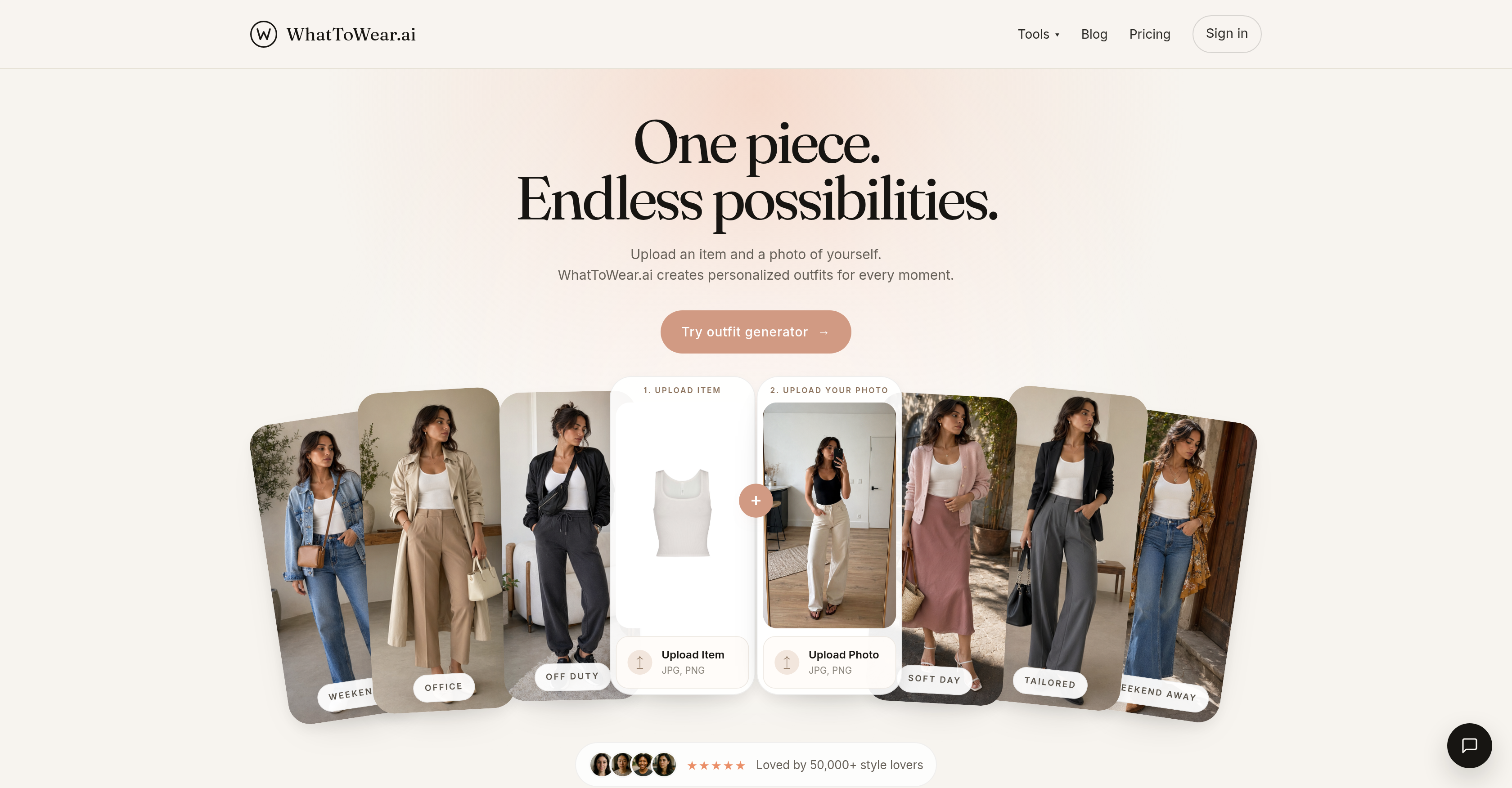
- Eliminate daily styling indecision by receiving complete, occasion-specific outfit ideas generated from a single uploaded garment and your full-body photo.
- Visualize exactly how each recommended look will appear on your body before getting dressed, using the Virtual Try-On feature that requires only a clear full-body picture.
- Achieve polished, proportional outfits every time as the AI pairs cropped tops with high-waisted bottoms and balances wide trousers with softer shoes.
- Build a restrained, expensive-looking color palette around your piece using two adjacent neutrals and one accent, ensuring every suggested outfit is color-coherent.
- Get instant styling options for any scenario—work, date night, travel, weekend, or casual—without scrolling through endless inspiration boards.
- Control your privacy completely because your uploaded photos stay on your device and are never stored or uploaded by the system.
- Refine your entire look down to the hair, choosing whether the AI polishes, keeps, or freely restyles your hair to match the generated outfit.
- Generate outfit ideas in Garment-only mode using just your clothing item, or switch to Person mode for body-aware suggestions that account for your shape and proportions.
Pros & Cons
Pros
- Personalized outfit suggestions
- Virtual Try-On feature
- Context-specific outfit generation
- Balance and coherence in color
- Emphasis on proportion
- Garment-only and Person mode
- Outfit guides and blogs
- Category-based styling options
- Event specific outfits
- Outfit balancing
- Educative styling content
- Multiple outfit looks
- Uploading multiple photo formats
- Analysis by dominant color
- Styled on personal photo
- Gender specific styling
- Informs about outfit proportions
- Offers styling notes
- Offers Restrain color palettes
- Guides on point of interest
- Aspirational and wearable outfits
- Personal color analysis
- Incorporates user's uploaded item
- Event-specific looks generation
- Style notes on wardrobe
- Style around one garment
- Multiple look generation
- Multi-purpose outfit ideas
- Operates on credits
- Outfit from one piece
Cons
- Requires full-body photo
- Not compatible with PDFs
- Limited outfit scenarios
- No video tutorials
- No mobile app available
- Requires item picture upload
- No multilingual support
- No HEIC compatibility
- Limits on outfit suggestions
- Two modes cost differently
Reviews
Rate this tool
Loading reviews...
❓ Frequently Asked Questions
The Virtual Try-On feature of WhatToWear.ai allows users to envision how the AI's recommended outfits would look on them. Users can gain this visualization by uploading a clear, full-body picture of themselves.
WhatToWear.ai generates personalized outfit suggestions based on a user's uploaded clothing item and full-body photo. It considers various factors like color balance, styling proportions, and appropriateness for different occasions to generate wearable yet stylish looks. The AI then categorizes these styling options by garment type and color. Users can choose to run the process using 'Garment-only' or 'Person' mode.
Yes, WhatToWear.ai can assist users in making outfit choices for specific occasions such as dates, travel, everyday wear, work, and weekends. Users can explore the platform and generate outfit ideas suitable for these scenarios.
WhatToWear.ai maintains balance and coherence in color of the outfits suggested by keeping the palette restrained and expensive looking. It builds around the user's piece in two adjacent neutrals and one accent at most.
The 'Garment-only' mode in WhatToWear.ai is a feature that allows users to generate outfit ideas based solely on an uploaded garment. This option doesn't require a user image and focuses on the outfit creation around the uploaded clothing item.
The 'Person' mode in WhatToWear.ai works by generating personalized outfit ideas based on both the user's uploaded clothing item and their full-body photo. This allows the AI to take into account the individual's body shape, proportional considerations and overall aesthetics.
Yes, WhatToWear.ai can generate a complete set of outfit ideas based on a single uploaded item. The AI builds the outfit around the piece the user has uploaded, maintaining balance and coherence in style, color, and proportion.
In WhatToWear.ai for outfit generation, users can upload files in JPEG (JPG) or PNG format, and the file size should be under 8MB.
Yes, WhatToWear.ai has the option to assist users with hair styling decisions. Users can choose whether to have the AI polish the uploaded hair, keep the hair similar or freely restyle it.
Yes, WhatToWear.ai offers resources like blogs and outfit guides to assist users. These resources aim to help users in making more informed clothing decisions, providing practical advice on a variety of fashion related topics.
Yes, WhatToWear.ai can provide outfit suggestions for both men and women. The platform includes options for women's and men's styling.
Yes, to generate a comprehensive set of outfit suggestions, users are prompted to upload a clear, full-body picture of themselves on WhatToWear.ai. This allows the AI to envision how the outfits would look on the user.
The process of generating outfit ideas in WhatToWear.ai involves users uploading a piece of clothing as well as a full-body photo of themselves. Users can specify clothing category, dominant color, and occasion. Subsequently, they decide on looks, hair styling, and mode of outfit generation between garment-only or person mode. After all these selections, the user prompts the AI to generate the wardrobe looks.
WhatToWear.ai categorizes its styling options based on clothing category and dominant color. Categories include but are not limited to cardigan, shirt, blouse, t-shirt, knit top, skirt, pants, trousers, jeans, dress, coat, jacket, shoes, and bag. Colors range from ivory, cream, white, beige, camel, brown, chocolate, black, grey, and many more.
Yes, while uploading an item for outfit suggestions in WhatToWear.ai, users have the option to specify the occasion they need the outfit for. Occasions can be weekend, casual, work, office, date night, brunch, travel, vacation, streetwear, or party.
Yes, users can choose to run the outfit generator either with only the garment, i.e., 'Garment-only' mode or with the inclusion of the user's body image in the 'Person' mode.
Yes, WhatToWear.ai places significant emphasis on proportion in the outfits suggested. For instance, a cropped knit might be paired with a higher waist clothing item, or wide trousers might be paired with a softer shoe. The idea is to maintain a balance before ornament.
Yes, while initiating the outfit suggestion process in WhatToWear.ai, users can choose their dominant color from a provided list. That allows the AI to provide outfit suggestions that are coordinated around the selected color.
In WhatToWear.ai's outfit generation, each run costs credits. Operating in 'Garment-only' mode costs 1 credit, and using 'Person' mode costs 2 credits.
Photos uploaded on WhatToWear.ai stay on the user's device. WhatToWear.ai does not upload or store any user photos. Therefore, users retain full control and ownership over their pictures at all times.
Pricing
Pricing model
Freemium
Paid options from
$4.99/month
Billing frequency
Monthly