Voice Cloner
Overview
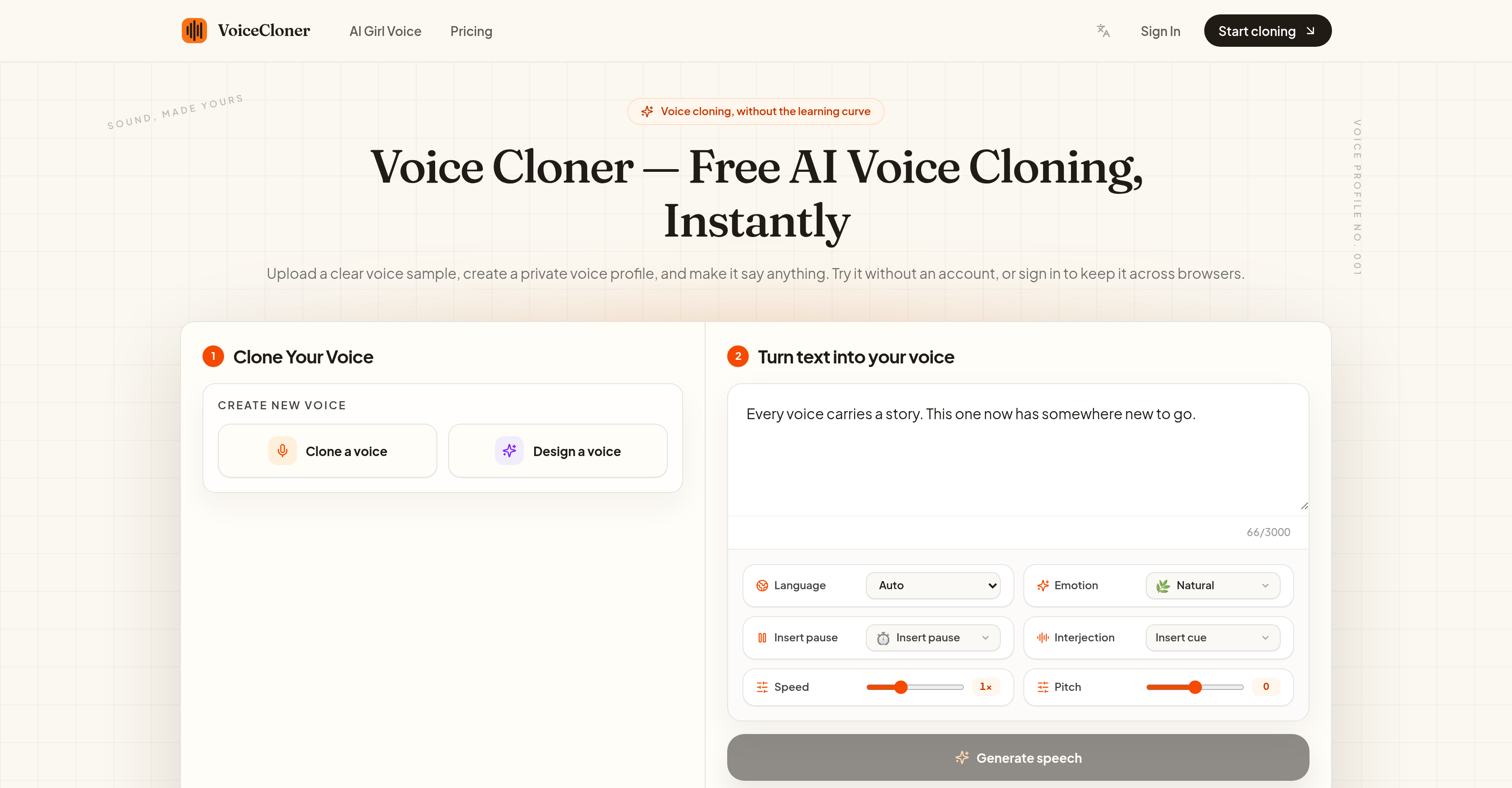
- Start cloning any voice immediately without creating an account or undergoing extensive training, using the tool's no-sign-up, short-sample voice cloning process
- Produce audio in multiple major global languages including English, Spanish, French, Japanese, Hindi, and Arabic from a single voice profile for multilingual voice work
- Generate ready-to-use audio files for podcasts, video narrations, and online courses in MP3 or WAV formats using the text-to-speech conversion feature
- Keep your voice data secure with a privacy-first approach that never sells or shares your data and deletes uncloned audio samples after 30 minutes
- Access your private voice profile across different browsers when signed in, using the cross-browser profile storage option
Pros & Cons
Pros
- Short audio sample sufficient
- Efficient voice cloning
- Personalized voice profiles
- No sign-up required
- Supports major global languages
- Multilingual voice work
- Generates MP3, WAV formats
- User profile storage
- Privacy-first approach
- Doesn't sell/share voice data
- Deletes uncloned samples
- Can create podcasts
- Can create video narrations
- Can create online courses
- Free and unlimited usage
- Multiple language support
- 30-minute data deletion
- Voice profile portability
- High fidelity cloning
- Fast setup and cloning
- No training job needed
- Quick profile preparation
- Downloadable speech generation
- Multilingual from one profile
- Watermark-free MP3 downloading
- Clear from sample to download
- Focus on singular workflow
- Voice data deletion request
- Pending samples deletion
- Versatile application usages
- Constant tone across languages
- Maximum voice profile count
- Custom voice profile creation
- High-fidelity HD voice cloning
- Instant voice cloning
- Quick text to speech
- Produces cleaner profiles
- Consistent pronunciation
- Custom platform-no generic voices
- Optional sign-in feature
- Pending samples deletion
- Voice profile accessibility
- Audio sample retention
- Post-cloning audio retaining
- Flexible credit system
- Free trial credits
Cons
- Requires clear voice samples
- Only supports major languages
- Limited audio format options
- No real-time audio processing
- No integrated text editor
- Profile storage only for signed-in users
- Doesn't include celebrity voices
Reviews
Rate this tool
Loading reviews...
❓ Frequently Asked Questions
Voice Cloner is a tool which, with the help of AI, can clone any voice using a short audio sample. It captures vocal patterns such as tone, rhythm, and vocal character to create a personalized voice profile. The voice profile serves as the template for text-to-speech conversion, thus effectively replicating the user's voice.
Voice Cloner uses a user's uploaded voice sample to capture various vocal patterns like tone, rhythm, and vocal character with the help of AI. It creates a personalized voice profile that serves as a template for text-to-speech conversion, mimicking the user's voice.
Voice Cloner requires a clear voice sample of between 30 and 120 seconds without music, echo, or any background noise. It should ideally be one speaker, recorded in a quiet room. This helps it capture the desired vocal identity more accurately.
Voice Cloner can provide voice copies in MP3 or WAV formats.
The ideal sample length for Voice Cloner to operate efficiently is between 30 to 120 seconds.
Yes, Voice Cloner supports major global languages, such as English, Spanish, French, Japanese, Hindi, Arabic for voice cloning.
No, it is not necessary to create an account to use Voice Cloner. However, signing in allows the user to store their private voice profile across browsers.
Voice Cloner employs a privacy-first approach. It does not sell or share users' voice data. After the process is complete, uncloned audio samples are deleted after 30 minutes to ensure data privacy.
Voice Cloner deletes uncloned audio samples after 30 minutes as part of its data privacy protocol. This ensures that user data is not unnecessarily stored or at risk of potential misuse.
In Voice Cloner, a 'voice profile' is a personal representation built from a user's recording. It captures the tone, rhythm, and vocal character of that specific voice. This profile is used as a template for any text-to-speech conversion.
Yes, if you are signed in to Voice Cloner, you can store your private voice profile across various browsers.
No, sign-up is not necessary to use Voice Cloner. Users can clone a voice instantly without setting up an account.
Yes, Voice Cloner can be used to generate audio for podcasts, video narrations, online courses and more.
Yes, Voice Cloner provides an option for signed-in users to store their private voice profile in the browser.
Voice Cloner ensures the privacy of your voice data by not selling or sharing it. After the cloning process is completed, any pending voice samples that have not been cloned are removed after 30 minutes, maintaining user data security.
Voice Cloner can clone any voice that is provided to it in the form of a clear voice sample. There is no specific type of voice it is limited to.
The audio files generated by Voice Cloner can be used for a broad range of applications, such as podcasts, video narrations, online courses and much more.
Voice Cloner supports a wide variety of languages for voice cloning including major global languages like English, Spanish, French, Japanese, Hindi, Arabic and others.
Yes, Voice Cloner can convert text-to-speech using the voice profile created from a user's voice sample.
Voice Cloner is highly efficient compared to other voice cloning tools, as it does not require any sign-up or extensive training. It can quickly create a personalized voice profile using short audio samples and supports a wide range of languages for multilingual voice work.
Pricing
Pricing model
Freemium
Paid options from
$7.90/month
Billing frequency
Monthly