Overview
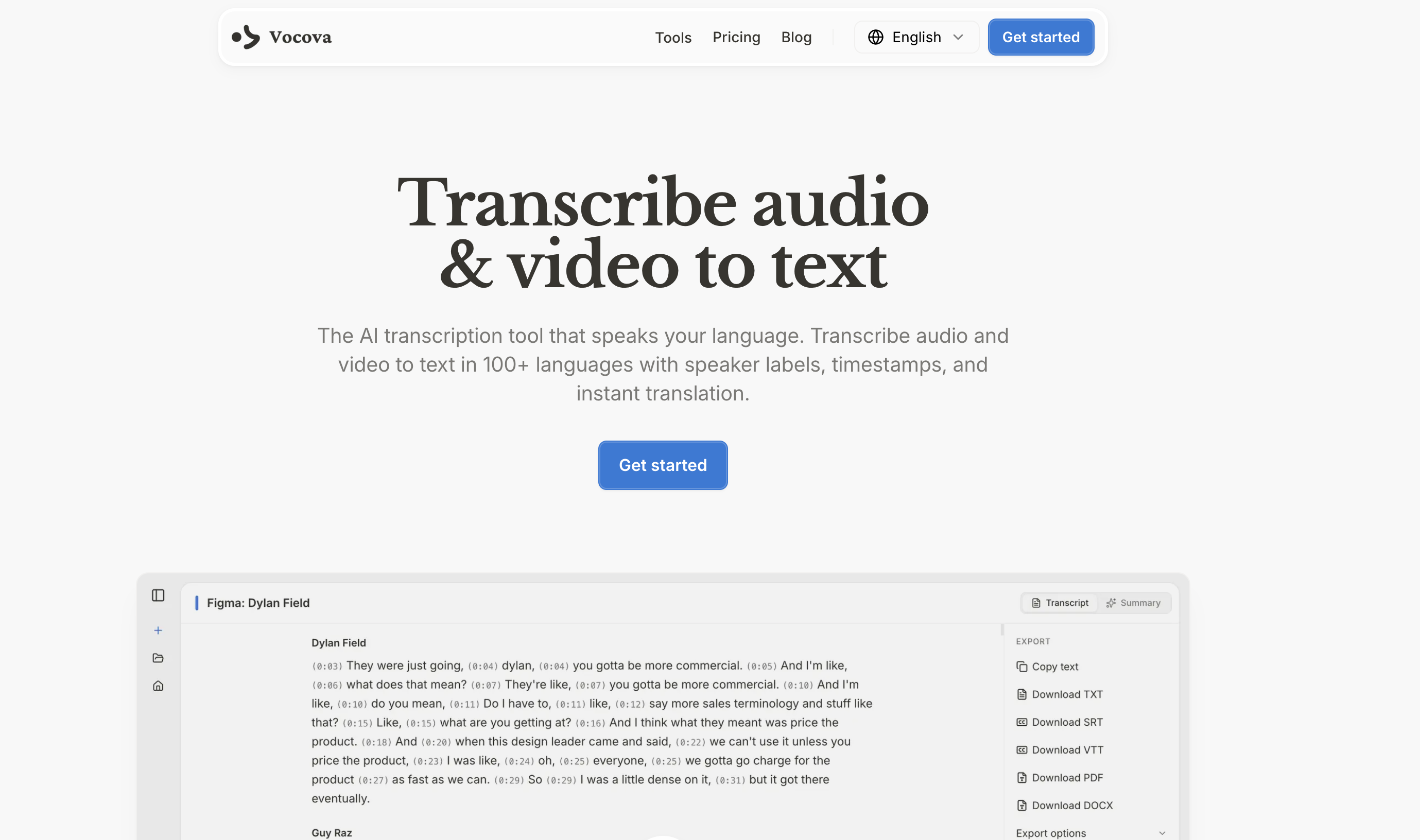
- Transcribe any online audio or video instantly without downloading files, using direct URL import from YouTube, TikTok, Google Drive, and 1000+ other platforms.
- Create perfectly formatted, ready-to-use subtitles and documents, exporting transcripts in SRT, VTT, PDF, DOCX, TXT, and CSV formats for any workflow.
- Translate your entire transcript for global audiences, converting text into 145+ languages and viewing it in bilingual side-by-side mode for accurate localization.
- Identify every speaker in a conversation automatically, with AI-powered speaker labeling that organizes interviews, meetings, and multi-person recordings clearly.
- Pinpoint exact moments in your audio with word-level timestamps, enabling precise video editing, content clipping, and easy fact-checking.
- Understand long recordings in seconds with an AI-generated summary that extracts key points, saving hours of manual review and note-taking.
- Edit both the original and translated text directly in the interface, making corrections and adjustments before final export to ensure perfect accuracy.
- Access your work from any device at any time, with all files stored securely in your private cloud storage—no installations or downloads required.
- Share finished transcripts instantly with clients or teams via a public link, allowing others to view without needing an account.
Pros & Cons
Pros
- Transcribes 100+ languages
- Multi-platform import support
- PDF, DOCX, SRT exports
- Automated language detection
- Native-level transcription accuracy
- User-friendly interface
- Accurate word-level timestamps
- Speaker identification
- Review and edit in-line
- Translate to 140+ languages
- Link extraction for audio
- Privacy-focused file handling
- Cloud-based storage
- Adaptable across devices
- No downloads or installations required
- Real-time progress tracking
- Video/Audio auto-extraction from URL
- Edit original and translated texts
- Multi-format export capability
- Bilingual view mode available
- Video/Audio import from 1,000+ platforms
- State-of-the-art speech recognition
- Transcribe directly from URLs
- Transcript sharing by link
- Timestamped speaker labels
- Works seamlessly on any device
Cons
- No offline functionality
- No real-time live transcription
- No dedicated mobile app
- No offline mode
- No browser extension
Reviews
Rate this tool
Loading reviews...
❓ Frequently Asked Questions
Vocova is an Artificial Intelligence-powered tool that converts audio and video content to text in over 100 languages. The service supports importing content from a vast array of platforms, such as YouTube, Google Drive, and Dropbox, and exports transcripts in formats like PDF, DOCX, and SRT. Vocova utilizes AI to generate precise word-level timestamps and speaker identifications. It provides secure storage for transcripts and audio files in the cloud and prioritizes user privacy by allowing only user-access to files.
To use Vocova to transcribe audio to text, you would have to either drop an audio file or paste a URL. The AI processes the material, creating speaker labels and precise word-level timestamps. Once the transcript is generated, you can review and edit it in-line, and if required, translate it into one of 140+ supported languages before exporting it in a range of formats.
Vocova supports transcription in over 100 languages with native-level accuracy. It also provides translation into 140+ languages.
The method to transcribe video to text with Vocova involves uploading a video file or pasting a URL from one of the numerous supported platforms. The AI processes the video, generating a transcript complete with precise word-level timestamps and speaker identifications. After creation, users can review and edit the transcript in-line. They also have the option to translate it into one of 140+ languages before exporting it in several different formats.
Yes, Vocova allows for speaker identification in the transcripts. The AI technology within the tool can precisely identify different speakers as it processes the audio or video content.
Yes, Vocova has the capability to detect language automatically in the files being transcribed. It supports automated language detection for more than 100 languages.
Yes, after a transcript is generated, users can translate it into one of 140+ languages using Vocova. Users have the flexibility to review and edit their translations before export.
Vocova is compatible with numerous platforms for importing audio and video content. These include YouTube, Google Drive, Dropbox, and over 1,000 other platforms.
With Vocova, users can export their transcripts in multiple formats. These formats include PDF, DOCX, and SRT to cater for various use cases.
Vocova ensures privacy in handling user data by securely storing and handling all user files. Each user's files are stored in a secure cloud system and access is restricted to only that user. Vocova does not share audio or transcripts with anyone, guaranteeing that all data remains private.
You can start using Vocova for free. There is no initial cost and all you need to do is simply drop an audio or video file, or paste a link to begin.
Yes, Vocova does offer advanced options as part of the tool's premium offering. While it is still enjoyable for free, certain more intricate characteristics might be limited to premium service.
Yes, once the transcript is created, you can review and edit it in-line using Vocova. The interface allows you to make changes as necessary and then export the edited transcript in your preferred format.
Vocova is adaptable across devices and works efficiently on desktops, tablets, and phones. It does not necessitate any software installations or downloads to operate, providing flexibility for the user.
Yes, Vocova extracts audio automatically from the pasted link. Vocova's link extraction function works across multiple platforms, making it user-friendly and efficient.
Yes, with Vocova, transcripts and audio files are stored in the cloud, allowing flexibility in access and editing. This means that you can access your files anytime, from any device, making it highly convenient.
To start the transcription process with Vocova, you can drop an audio or video file or paste a URL. The AI in Vocova then processes the content, generating the transcript with timestamps and speaker identifications.
Yes, Vocova generates precise word-level timestamps. This feature comes in handy, especially in transcripts where it's important to know exactly when a particular word or phrase was spoken.
Link extraction from multiple platforms with Vocova involves pasting a link from the preferred platform. Vocova then automatically extracts the audio from the linked content, eliminating the need for manual intervention and thus making it more user-friendly.
No, Vocova does not require any software installations or downloads to operate. It is a web-based service, which means that you can access it from any device with an internet connection, including desktops, tablets, or phones.
Vocova operates through a simple three-step process. The user begins by uploading their audio or video files or pasting a URL. Next, Vocova's AI processes the audio or video content, transcribing it to generate an accurate transcript complete with speaker labels and timestamps. Finally, the user reviews, edits, and exports their transcript in a format such as PDF, DOCX, SRT, VTT, TXT, or CSV.
Yes, Vocova supports over 100 languages. It can transcribe and translate audio and video content across all these languages with native-level accuracy.
Yes, Vocova is equipped with an auto-detection feature that identifies the spoken language in the audio or video content that's uploaded for transcription.
Vocova takes pride in its state-of-the-art speech recognition models that deliver high-accuracy transcription across all the 100+ languages it supports. The transcripts come with AI-generated summaries encapsulating the key points at one glance.
Yes, Vocova supports imports from a wide array of platforms including YouTube, Google Drive, and Dropbox. The user can simply paste a URL from these platforms to auto-extract the audio for transcription.
Vocova allows the export of transcripts in diverse file formats including PDF, DOCX, SRT, VTT, TXT, and CSV.
Yes, after Vocova's AI generates the transcription, the user has the ability to review and in-line edit the transcript before exporting it.
Yes, Vocova offers the feature of translating transcriptions into more than 140 languages. The user can view the transcription in a bilingual mode and edit both the original and translated text whenever needed.
Vocova guarantees privacy and security of user files. The platform stores all files securely and they are accessible only by the user. The company never shares user audio or transcripts with anyone else.
Yes, Vocova operates efficiently across all devices. Whether it's a desktop, a tablet, or a phone, Vocova can be used to transcribe audio and video content from the browser directly.
No, Vocova does not require any downloads or installations. All your transcription needs can be accessed instantly on the browser of any device.
Vocova's AI is designed to identify different speakers automatically. It distinguishes between speakers in an audio or video file and labels them appropriately in the transcription.
Yes, Vocova allows link extraction from multiple platforms for automatic audio extraction. A user can paste a URL from a platform like YouTube, Google Drive or Dropbox and the audio is extracted automatically for transcription.
Yes, one of the options to start the transcription process on Vocova is by pasting a URL. Vocova auto-extracts the audio from the URL for transcribing.
Yes, Vocova provides clear word-level timestamps on the transcripts it generates, giving users the ability to see exactly when a certain word was spoken.
Vocova uses cloud-based storage for all transcripts and audio files. This allows the files to be accessible from any device at any time, providing considerable flexibility for the user.
Yes, Vocova stores all audio files and transcripts in the cloud permanently. This means they can be accessed, replayed, and edited by users anytime, from any device.
Yes, Vocova offers a free version for users to start with. It does not require any credit card information or set any time limits on the free plan.
Vocova facilitates the export of transcriptions in various formats such as PDF, DOCX, SRT, VTT, TXT, and CSV. Additionally, it allows for a bilingual side-by-side export with the original and translated text together.
Pricing
Pricing model
Free Trial
Paid options from
$9/month
Billing frequency
Monthly