
Tracelight Excel Add-in
Overview
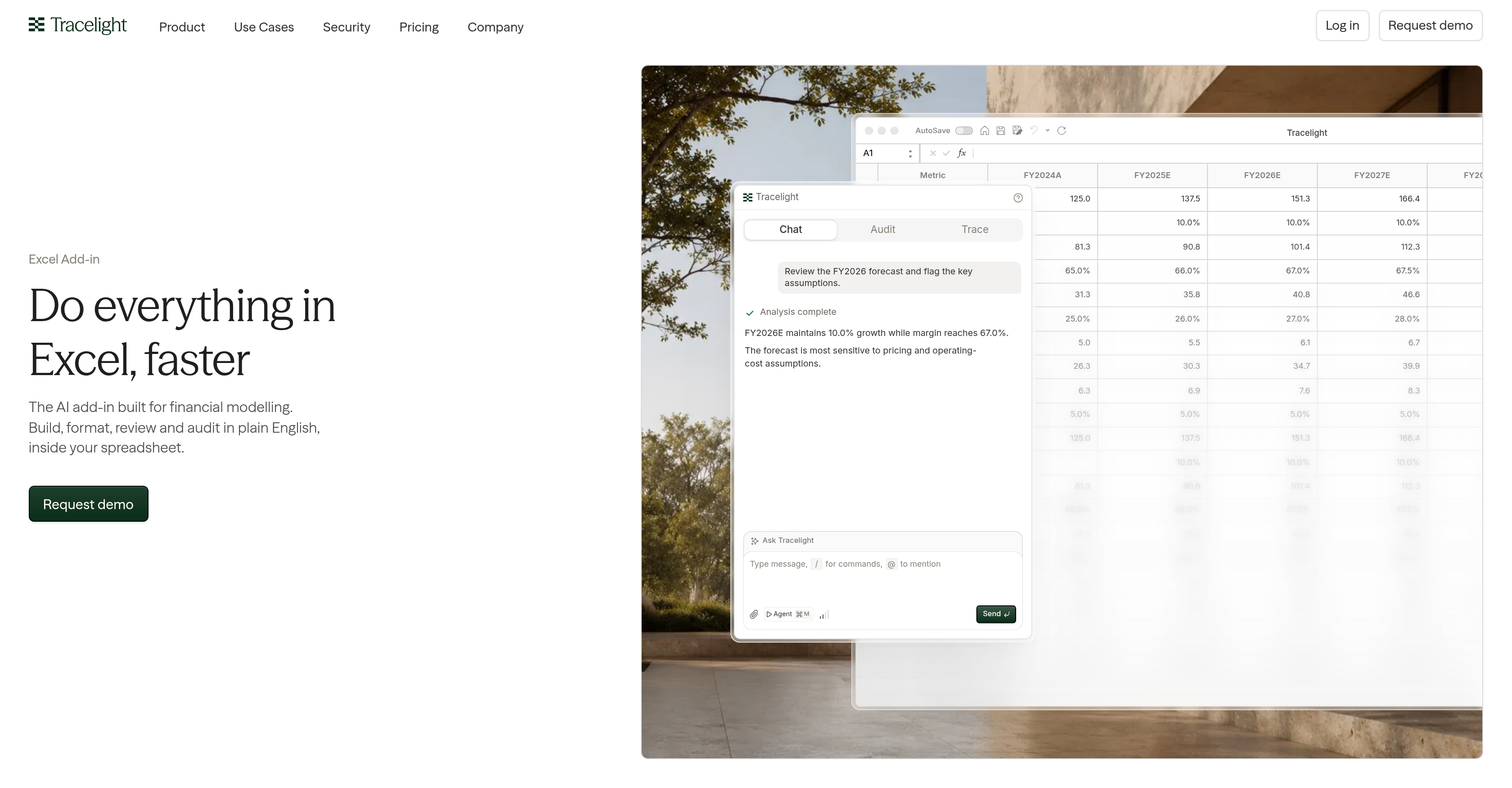
- Understand any formula instantly with plain-language interpretation that describes elements by label instead of cell address
- See how calculations flow across your model through flowchart-based logic mapping that visualises every data process behind a formula
- Catch critical assumptions before they affect decisions with automated forecast review that flags key assumptions across financial models
- Navigate workbooks of any size or complexity using complete visual overviews with easy-to-understand diagrams
- Eliminate formatting inconsistencies across every model through mass formatting that applies your defined styles—colors, fonts, number formats, and conventions
- Enforce your team's methodology on every task by embedding it into the tool, scaling repeated work with uniform approaches across distinct templates
- Prevent errors from reaching your workbook with a built-in spreadsheet engine that verifies, recalculates, and approves edits before they are written
- Maintain data integrity across all financial documents through background checks that validate every proposed change before it touches your model
Pros & Cons
Pros
- Efficient financial modelling workflow
- Streamlines forecast reviews
- Flags key assumptions
- Provides visual overviews
- Interprets formulas in plain language
- Describes elements by label
- Maps formula logic via flowchart
- Aligns with user's formatting styles
- Embeds team's methodology
- Scalability of repeated work
- Uniformity of approach with templates
- Own spreadsheet engine
- Verifies edits in background
- Handles workbooks of any size
- Supports excel add-in
- Ensures consistency in financial documents
- Effective for financial analysts and accountants
- Convenient for auditing financial models
- Offers mass formatting
- Facilitates business modelling
- Functional features for data mapping
- Checkbox for forecast review
- Produces predictable financial document outputs
- Supports team collaboration in financial modelling
- Excel spreadsheet management
- Workflow management
- Improves trade finance processes
- Supports accounting automation
- Excel Add-in efficiency
- Assures data audit
- PDF citations for document data
- Uploads a PDF
- Extracts figures into structured tables
- Offers workspace for complex models
- Holds compressed picture of whole workbook
- Tracks every edit made
- Allows review, approval or undo actions
- Reviews changelog
- Processes financial document formatting
- Handles financial data processing
- Allows data review
- Ensures verified edits
- Matches with firm's formatting style
- Explains formulas in plain language
- Follows methodology for all tasks
- Allows spreadsheet comparison
- Performs background checks before changes
- Ability to build COA mapping table
- Complete three-statement model
- Features company valuation
- Dealt schedule model
- Handles bottom-up model review
Cons
- Excel dependency
- Limited to financial models
- Requires specific formatting styles
- Not designed for real-time collaboration
- Lacks multi-language support
- No mobile functionality
- Possibly complex for non-accountants
- Non-transferable skillset to other software
- Dependent on user's methodology definition
- Time-consuming initial setup
Reviews
Rate this tool
Loading reviews...
❓ Frequently Asked Questions
Tracelight revolutionizes financial modelling workflow in Excel by offering an AI-enhanced add-in. It enables users to build, format, review, and audit financial models within their spreadsheets. Tracelight specializes in streamlining processes like reviewing forecasts, flagging key assumptions and providing visual overviews of complete workbooks, ensuring an efficient and intelligent workflow.
Yes, Tracelight is designed with capacity to handle complex and large workbooks. It holds a compressed picture of the entire workbook so it stays accurate no matter the complexity or size. It can perform this function backed by its benchmark testing.
Tracelight has a unique feature of interpreting any formula in plain, understandable language. This helps users understand complex calculations and interpret the logic behind them. It achieves this by describing formula elements by label rather than cell address and illustrating its logic through a clear, easy-to-follow flowchart.
Yes, Tracelight can maintain consistency in financial document formatting. It aligns with users' defined formatting styles across models. This ensures that the document outputs, including colors, fonts, number formats and conventions are consistent and predictable, aligning with the overall brand image and predefined styles.
Yes, users can embed their team's methodology into Tracelight which it then applies to all tasks. This feature facilitates the scalability of repeated work and also ensures a uniform approach when building financial models using distinct templates, promoting a harmonious workflow with team's unique modelling methods.
Tracelight offers comprehensive features for financial analysts, such as forecast review, mass formatting, data audit, financial document formatting, financial data processing, data review, financial analysis, workflow management, team collaboration, and data mapping among others. All these features aim to simplify and enhance the financial modelling workflow.
Tracelight holds its own spreadsheet engine which performs background checks and verifies edits before changes reach the user's workbook. This ensures an additional layer of data integrity where the proposed edits are verified, recalculated, checked and approved before they are written on the workbook.
Yes, flagging key assumptions is one of the main features of Tracelight. It can review financial forecasts to identify and highlight key assumptions, yielding a comprehensive analysis of data. These details and insights can be instrumental for financial analysts and other financial professionals in their decision-making processes.
Yes, Tracelight provides a detailed visual overview of financial models, irrespective of their size or complexity. It offers complete overviews of workbooks with easy-to-understand diagrams and flowcharts. The visual overviews facilitate the interpretation of complex data and offer valuable insights at a glance.
Tracelight can effectively handle all types of financial documents that involve financial modelling. This typically includes forecasts, financial models, various schedules, and possibly, other types of customized financial documents relevant to the user's requirements.
Predictability is fostered in Tracelight through its consistency in formatting styles across models. Tracelight aligns with users' defined styles, encompassing elements like fonts, colors, number formats, and conventions, to ensure a homogeneous appearance in all financial document outputs.
Yes, Tracelight is set for team collaboration. It allows users to embed their team's methodology into the tool, which facilitates a uniform approach when building financial models using distinct templates. This not only fosters team collaboration but also helps in ensuring scalability of repeated work.
Integrating Tracelight into Excel is seamless. Since it's an add-in, users will have to follow the procedures for adding an add-in to Excel, usually from the options or add-ins menu. Once added, Tracelight appears as a feature within Excel, ready to simplify and enhance the financial modelling process.
Yes, mass formatting is a feature that is readily available in Tracelight. This aligns with users' defined formatting styles across models ensuring a consistent and predictable look and feel in every financial document.
While specific details on trade finance are not given, Tracelight's strong focus on financial modelling, audit, review, and data processing implies that it should be able to handle trade finance requirements within these contexts.
Yes, Tracelight can be a valuable asset for your business modelling requirements. It's designed to help users build, format, review, and audit financial models. This includes the creation of business models, providing a comprehensive, AI-enhanced toolkit for modelling workflows.
Tracelight is geared towards enhancing financial planning with its ability to create, review, and audit financial models. This includes reviewing forecasts, flagging key assumptions and providing complete overviews of workbooks. Tracelight allows users to handle intricate financial planning tasks with ease.
Yes, one of Tracelight's features is the ability to map data. When interpreting a formula, Tracelight also maps its logic via a flowchart, which essentially visualizes the entire data process behind the formula, facilitating a better understanding of the data dynamics.
Yes, Tracelight has a comprehensive feature where it verifies all edits before they reach your workbook. This added layer of caution ensures no changes are made without your acknowledgement and approval, thereby maintaining absolute data integrity.
Tracelight focuses on ensuring supremely secure data handling and auditing processes. Though specific details on security measures are not provided, the inherent capabilities of Tracelight in managing, verifying, and auditing data express its robustness in terms of data security and audit.
Pricing
Pricing model
Free Trial
Paid options from
$40/month
Billing frequency
Monthly