
Selects by Cutback
Overview
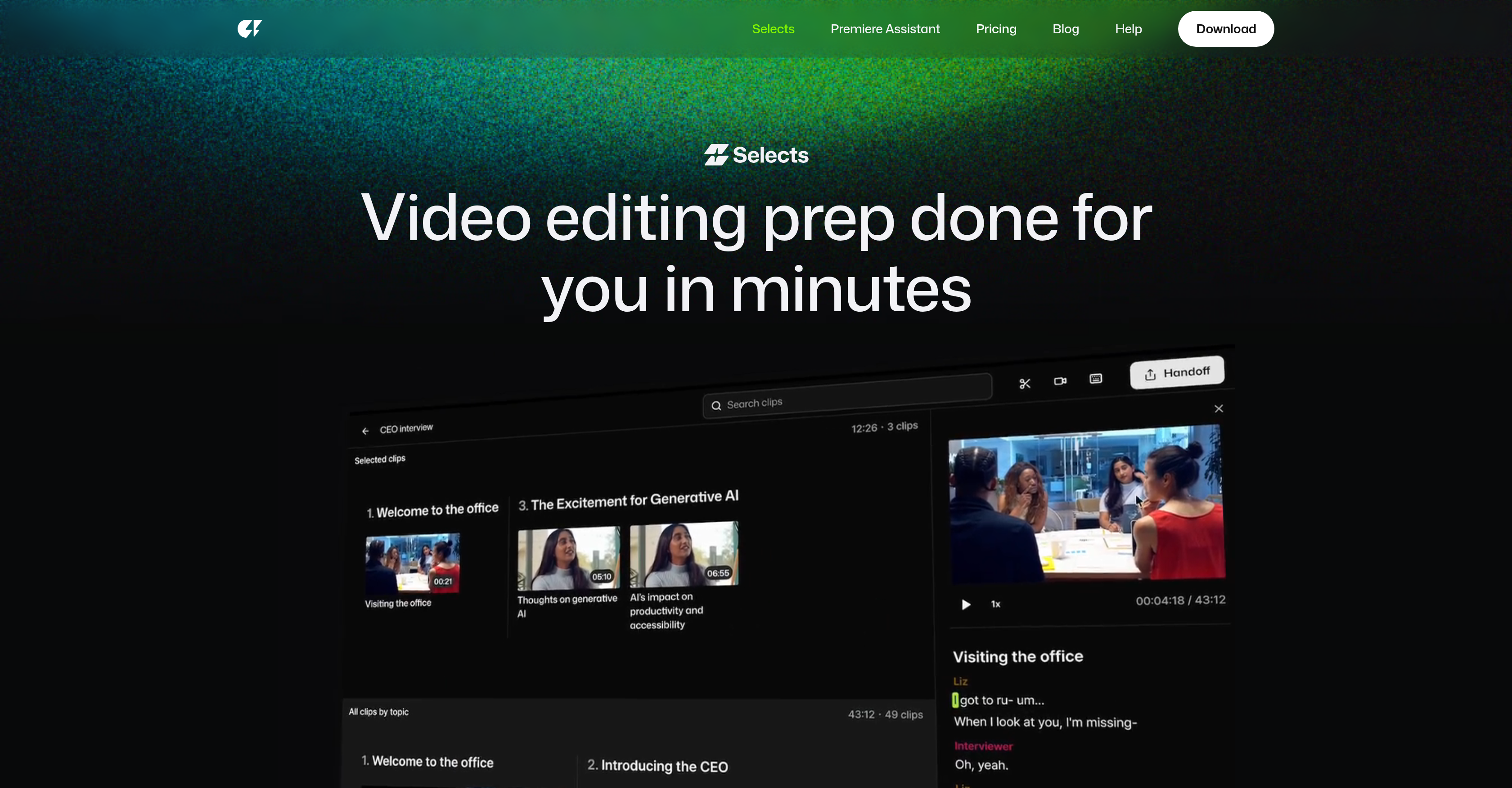
- Transform hours of raw footage into an organized, ready-to-edit project in minutes by dropping files into the AI-powered prep tool.
- Find any moment instantly without scrubbing using natural language search across your transcripts and footage.
- Automatically sync gigabytes of multi-camera files and switch angles based on the speaker for pro-grade multi-cam projects.
- Review hours of content in minutes with smart stringouts that segment footage into color-coded, topic-based chapters.
- Remove silences, filler words, and mistakes with a click using precision cutting powered by industry-leading AI accuracy.
- Craft story-driven rough cuts from prepped footage by experimenting with narrative structure and pacing instantly.
- Maintain complete creative control with a non-destructive, color-coded workspace that preserves your original files.
- Seamlessly continue editing by handing off organized projects with markers and transcripts to Premiere Pro, Final Cut, or DaVinci Resolve.
Pros & Cons
Pros
- Raw video prep automation
- Time-saving
- Adobe Premiere Pro compatible
- Final Cut compatible
- DaVinci Resolve compatible
- Supports different projects types
- Pro-grade multi-cam support
- Smart stringout with chapters
- Precision cutting
- Natural language search
- Structured, navigable footage
- Non-destructive editing
- Transcript sharing
- Video exporting
- Automated preprocessing
- Raw footage organization
- Project management feature
- Task differentiation
- 4K video support
- 360 video support
- Story-focused rough cuts
- Color-coded organization
- Narrative perspective
- Studio use suitability
- Podcast editing support
- Livestream editing support
- Event editing support
- Vlog editing support
- Documentary editing support
- Versatile post-production tool
- Efficient review process
- Seamless workflow integration
- Intuitive interface
- Effortless footage navigation
- Top studios approval
- Effective project management
- Flexible output options
- Clarity-focused features
- Eradicates time-consuming tasks
- Topic-based chapter organization
- Filler removal capability
- Supports complex editing processes
- Minutes preprocessing
- Supports creative workflow
- Elevated efficiency
- Transcript availability
- Seamless handover to other tools
Cons
- Limited editing software compatibility
- Not fully-adjustable automation
- No built-in video editing
- Limited language support
- Limited transcript exporting options
- Dependent on external NLEs
- Lacks advanced editing capabilities
- No mobile version available
- No direct social media export
- No feature for image editing
Reviews
Rate this tool
Loading reviews...
❓ Frequently Asked Questions
Selects by Cutback is a specialized tool that assists creators and studios by automating the initial steps of the video editing process. The tool focuses on the sorting, organizing, and reviewing stages of editing workflow and seamlessly embeds within various popular video editing software. Leveraging unique AI capabilities, Selects by Cutback facilitates the preparation of raw videos for detailed editing, supporting a range of projects from podcasts to live streams and documentaries.
Selects by Cutback employs advanced AI technology to efficiently sort, organize, and review raw video files. Users can drop raw video files into the tool, and the AI rapidly prepares these files, arranging and readying them for further fine-tuning. The hefty task of video preparation is performed significantly faster, freeing up valuable time for creators to focus on the actual creative editing process.
Selects by Cutback is designed to integrate with several mainstream video editing software options, including Adobe Premiere Pro, Final Cut, and DaVinci Resolve. This compatibility allows Selects by Cutback to embed smoothly into existing editing workflows.
Selects by Cutback streamlines the preparation of raw videos using its intelligent AI capabilities. Users simply drop their raw video files into the software, and these are swiftly organized and readied for detailed editing. This preparation includes the sorting and reviewing stages of the editing process, handled automatically by the AI, resulting in a more efficient, time-saving workflow for the user.
Selects by Cutback is versatile and can support the editing of a broad array of project types such as podcasts, live streams, documentaries, events, vlogs, and even long-form content. This flexibility allows creators and studios to use the tool across diverse editing requirements, enhancing the efficiency of their creative processes.
Selects by Cutback provides pro-grade multi-cam support, which is particularly beneficial for projects that require synchronization of multiple camera footages. It is capable of syncing gigabytes of multi-cam files smoothly, additionally offering a feature to switch cams based on the speaker. This provides further ease in reviewing and editing footage recorded from multiple angles.
The smart stringout with chapters feature in Selects by Cutback allows for organized and efficient reviewing of the footage. Your footage is automatically segmented into topic-based chapters, enabling you to review hours of footage in minutes. This functionality can greatly reduce time spent searching through footage and enhance the speed of the editing process.
Precision cutting in Selects by Cutback allows users to remove unnecessary parts of the video easily. Users can cut silences, filler words, and mistakes with just a click, thanks to the AI's industry-leading accuracy. This refined level of control can significantly improve the quality of the final edited video.
The natural language search feature in Selects by Cutback enables users to discover specific moments in their video footage rapidly. Users can search using natural language terms and quickly locate precise clips without the need for time-consuming scrubbing. This minimizes time spent on navigating through lengthy footage.
Utilizing its AI capabilities, Selects by Cutback can structure long-form content into an easily navigable video. By detecting natural breaks within the content, Selects forms a structured video segmented into manageable, polished chapters. This is especially beneficial for creators working with extended videos, as it makes the content easier to edit and review.
Yes, Selects by Cutback is fully compatible with your existing editing workflow. It is designed to sync with major video editing software like Adobe Premiere Pro, Final Cut, and DaVinci Resolve. This seamless integration allows you to harness the advanced AI capabilities of Selects by Cutback without disrupting your established editing process.
Through its AI technology, Selects by Cutback presents an organized, color-coded, non-destructive editing environment. Chapters are color-coded for easy identification, and markers, labels, and transcripts are included. All edits made within Selects by Cutback are non-destructive, ensuring that you always have the highest level of control over your content.
Transcripts created within Selects by Cutback can be easily shared. After being generated, these transcripts can be shared for paper cuts. This ease of sharing extends the collaborative capabilities of the tool, allowing team members or individuals to access vital information about the project.
When the rough cut is complete and meets the user's requirements, Selects by Cutback can handle the video export process. This streamlines the process of preparing your video for the final production stage or allowing it to be used within other platforms or tools.
Selects by Cutback employs its advanced AI to manage multi-cam files. The software can automatically sync gigabytes worth of multi-cam files, saving editors significant time on syncing footage manually and ensuring more precise synchronization.
Yes, Selects by Cutback does support high-resolution formats, including 4K and 360 degrees videos. This ensures that creators working with high-resolution footage can still take advantage of Selects by Cutback's time-saving features without compromising on video quality.
To find specific moments in the video footage with Selects by Cutback, the natural language search feature can be used. This powerful feature allows you to enter descriptive terms related to the footage in consideration, and the AI system will scan the footage and return precise moments in the video that correspond to your search terms. It simplifies the process of finding accurate points in long and complex footages.
The AI in Selects by Cutback streamlines the process of structuring the video footage into an easily navigable format. By segregating the footage into topic-based chapters, it creates an organized structure. This functionality particularly shines when working with long-form content, organizing it into a video that is convenient to navigate and edit.
The multi-cam support feature in Selects by Cutback is capable of syncing gigabytes of multi-cam files in a short timeframe. It efficiently records all the footage from the various cameras used during filming, collates them, and syncs them up perfectly. This functionality is highly beneficial in projects involving multiple camera angles.
Selects by Cutback's precision cutting ability enables high precision in trimming unwanted parts from video footage. It allows users to manually target and remove specific elements such as silences, filler words, and errors. The AI's robust recognition capabilities, combined with an intuitive user interface, provide an easier, faster, and more accurate cutting experience.
Selects by Cutback uses AI to automatically and quickly prepare raw videos for detailed editing. Users can drop their raw files into the tool and get organized, ready-to-edit projects in a matter of minutes. Features such as pro-grade multi-cam support, smart stringout with chapters, precision cutting and natural language search tools ensure accuracy and efficiency in the review and organization stages.
Selects by Cutback syncs with several popular video editing software like Adobe Premiere Pro, Final Cut, and DaVinci Resolve.
Selects by Cutback supports a variety of video project types including podcasts, live streams, documentaries, events, and vlogs.
Selects by Cutback automatically organizes your raw video files into easy-to-navigate chapters based on topics. It also supports color-coding for additional organization and precision.
Yes, Selects by Cutback supports multi-camera projects. It can automatically sync multiple camera files and even switch cameras based on the speaker.
The 'smart stringout with chapters' feature in Selects by Cutback automatically organizes your footage into topic-based chapters. This helps in navigating and reviewing hours of footage in a significantly less amount of time.
The natural language search feature in Selects by Cutback allows users to find specific moments in the footage instantly. This works by typing in related words or sentences into the search tool, eliminating the need for manual scrubbing.
Yes, Selects by Cutback allows the sharing of transcripts. This feature can be particularly helpful for collaboration or paper cuts.
Yes, Selects by Cutback allows the export of videos if the Selects rough cut is ready to go.
The 'precision cutting' feature in Selects by Cutback allows you to trim unwanted parts such as silences or filler words with industry-leading accuracy.
Yes, Selects by Cutback supports editing for both 4K and 360° videos.
Yes, Selects by Cutback can be used for editing both podcasts and live streams. Its capabilities extend beyond traditional video editing, to serve the needs of different project types.
Selects by Cutback streamlines the reviewing process by automatically organizing footage into topic-based chapters. It helps you review hours of footage in minutes, and with its natural language search, you can find specific moments instantly without needing to scrub through the whole content.
Yes, the Storyline feature of Selects by Cutback allows transformation of prepped footage into story-driven rough cuts using AI. This feature helps in experimenting with the structure and pacing instantly.
Selects by Cutback aids effective project management by organizing footage into color-coded chapters, markers, labels, and transcripts. Furthermore, edits within Selects are non-destructive, allowing the user to remain in control.
The 'narrative perspective' feature in Selects by Cutback is the tool's ability to transform prepped footage into story-driven rough cuts. This allows for easy crafting of narratives and experimenting with pacing.
Selects by Cutback can be downloaded from their website.
Pricing
Pricing model
Paid
Paid options from
$16/month
Billing frequency
Monthly
Refund policy
No Refunds
Related Videos
How to Use Selects (Quick Demo)
Cutback•139 views•Nov 16, 2025