Premiere Assistant by Cutback
Overview
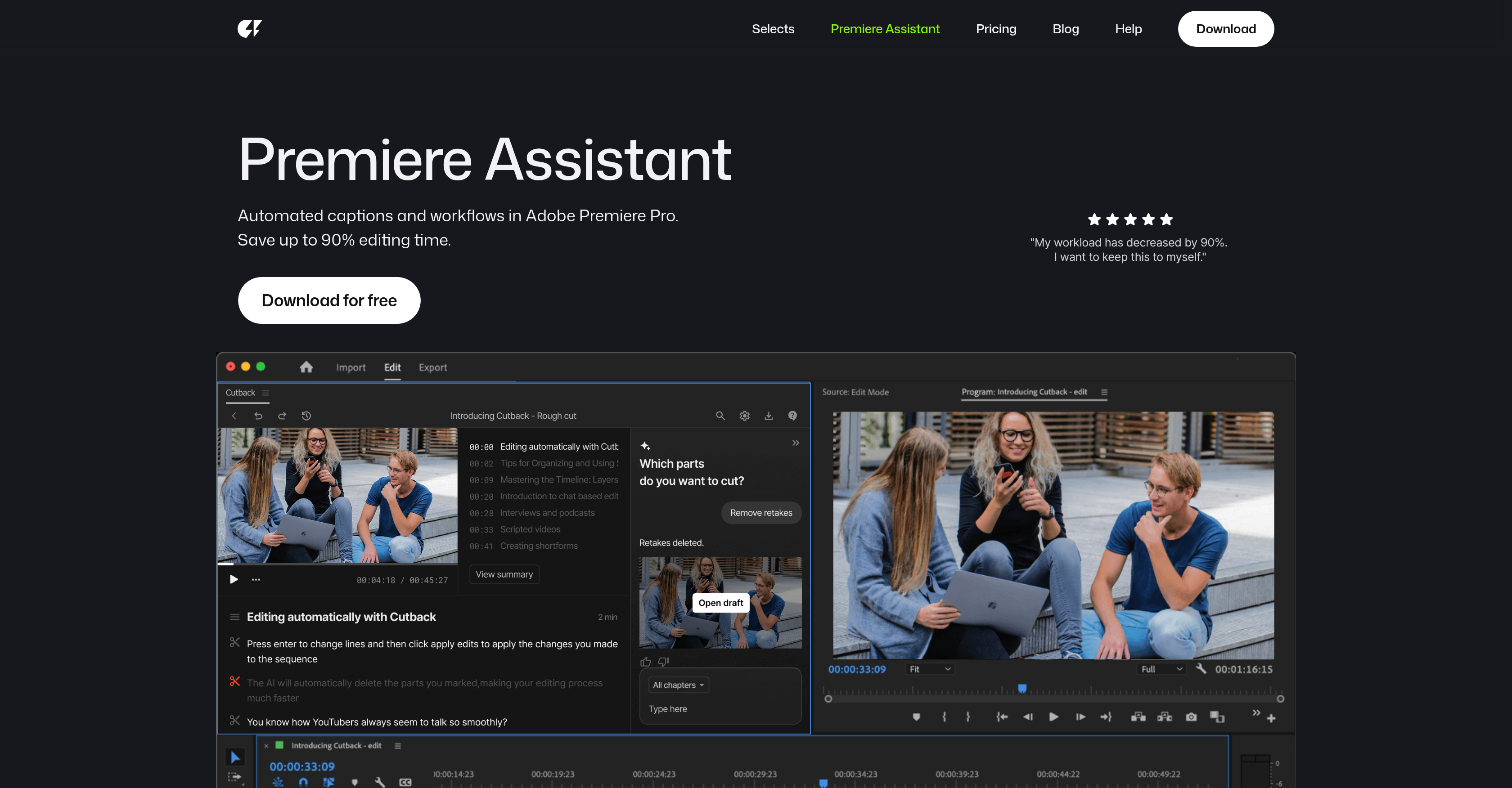
- Turn hours of raw footage into a polished rough cut in minutes using the auto rough cut feature that selects the best takes and discards unnecessary parts.
- Create seamless multi-camera edits automatically with speaker-aware track switching that mutes irrelevant audio without manual selection.
- Generate and edit precise video transcriptions directly in Premiere Pro, then use the text to make cuts and edits for a faster, more structured workflow.
- Expand your global audience by translating video content into up to 29 languages with the automated translation feature.
- Instantly remove silent sections from hours of footage across multiple tracks to tighten pacing and maintain viewer engagement.
- Add professional animated captions with depth effects in a few clicks using preset styles like word-for-word and karaoke.
- Isolate subjects with one-click background removal for videos and images to create depth effects and enhance visual storytelling.
Pros & Cons
Pros
- Automates repetitive tasks
- Integration with Adobe Premiere Pro
- Automates raw footage editing
- Multi-cam editing feature
- Automated transcriptions
- Transcription editing within Premiere Pro
- Translation of content into languages
- Automated removal of silences
- Animated caption addition
- Video and image background removal
- Automatic selection of best takes
- Sound bite detection
- Automatic track switching
- Interactive chatbot
- Visual effects and motion presets
- Creates high-quality outputs
- Single-click background removal
- Automatic detection of speaker changes
- Automated workflow improvements
- Cuts unnecessary parts from footage
- Support for multi-language transcription
- Auto multi-cam switching
- Direct in-software transcript editing
- One-click video content translation
- Silent section detection and removal
- Visual effects for videos and images
- All-in-one copyright-free media search
- Animate images, videos, text
- Improve image quality
- Zero manual selection for multi-cam
- Offers depth effect caption presets
- Image and video background removal
- Switches video tracks automatically
- Mutes unneeded audio automatically
- Supports multiple video and audio tracks
- Includes motion graphics
- Automated captions in just 2 clicks
- Removes silent parts with precision
- Trim video feature
- Greater audience reach with translation
- Productivity enhancement for video editing
- Hours of work done in minutes
- Supports short forms to VOD platforms
- Community feedback integration
- High speech-to-text transcription accuracy
- Automatic editing of raw footage
- Transcribe video into document-like format
- Handles workload of top professionals
Cons
- Only for Adobe Premiere Pro
- Missing advanced editing offierings
- Unknown speech-to-text accuracy
- Availability on specific platforms uncertain
- Price transparency missing
- Unspecified language support
- Limited visual effects tools
- Unspecified image resolution improvement
- Lack of user customization
- Limited community feedback integration
Reviews
Rate this tool
Loading reviews...
❓ Frequently Asked Questions
Premiere Assistant by Cutback is an AI-powered tool designed to perform a wide range of repetitive video editing tasks within Adobe Premiere Pro to enhance productivity.
Premiere Assistant enhances productivity by automating numerous video editing workflows such as auto-editing raw footage and multi-cam, transcribing and translating, adding animations, removing silences, and more.
Premiere Assistant automates tasks like raw footage and multi-cam editing, transcription and translation, silence removal, animation addition, best takes selection and discarding of unnecessary parts, among others.
Premiere Assistant's auto rough cut feature is designed to automatically select the best takes and discard unnecessary parts from the raw footage.
The multi-cam editing option in Premiere Assistant works by automatically shifting video tracks when a speaker is talking and muting irrelevant audio, eliminating manual selection.
Yes, Premiere Assistant is capable of accurately transcribing videos.
Yes, users can edit the transcriptions directly in Adobe Premiere Pro using Premiere Assistant.
Premiere Assistant's translation feature supports multiple languages, allowing for the expansion of audience reach.
Premiere Assistant effectively removes silences from videos by accurately identifying and eliminating silent sections, thus saving substantial editing time.
With Premiere Assistant, users can add animated captions quickly with just a few clicks.
Yes, Premiere Assistant provides a feature that allows for the removal of backgrounds from both videos and images.
Premiere Assistant integrates seamlessly into the Adobe Premiere Pro platform, streamlining the video editing process and enhancing overall efficiency.
Yes, Premier Assistant's auto rough cut feature is designed to detect the best takes and discard unnecessary parts from raw footage automatically.
Premiere Assistant's transcription feature boasts of excellent accuracy in its support for video transcriptions and allows users to edit the transcript directly in Premiere Pro.
Premiere Assistant helps in expanding audience reach by offering a translation feature that enables transcribing video content into multiple languages.
Premiere Assistant is proficient at saving editing time. Its functionalities like the removal of silences, automated multi-cam editing, and more, assist in speeding up the editing process.
Premiere Assistant offers various tools, effects, and motion presets to aid in the creation of visual effects and motion graphics.
Premiere Assistant's auto rough cut feature is an intelligent function that automatically selects the best takes and cuts unnecessary parts from raw footage, enhancing overall video quality and reducing video length.
Premiere Assistant provides assistance with multi-cam editing by automatically switching video tracks when a speaker is talking and muting irrelevant audio. This obviates the need for manual selection.
Based on user testimonials on their website, some users have subscribed to an annual plan for Premiere Assistant. A definitive answer can't be given as there's no explicit price list or subscription plans mentioned on their website.
Premiere Assistant automates video editing by handling repetitive tasks that often consume significant time and resources. Its functions include automatic raw footage editing, where it selects the best takes and discards unnecessary parts. It also has an auto multi-cam editing function, which automatically switches video tracks when the speaker changes and mutes irrelevant audio. Alongside these, Premiere Assistant automates the transcription process, translating content into multiple languages, detecting and removing silent sections in the footage, and adding animated captions.
Premiere Assistant handles multilingual translations by integrating a feature that can automatically translate video content into up to 29 different languages. This allows users to broaden the audience reach of their content, making it accessible and understandable across different language speakers.
The auto multi-cam editing feature in Premiere Assistant is designed to automate video track management, particularly in multi-speaker scenarios. It automatically switches video tracks when a different speaker is talking and mutes unnecessary audio. This eliminates the need for manual selection and editing, offering convenience and saving valuable editing time.
Premiere Assistant is equipped with a feature for detecting and removing silent sections from videos. By identifying these sections, it automatically cuts out all the silent parts, thereby reducing the overall video duration and maintaining viewer engagement. This process works with multiple video and audio tracks, even with hours of footage.
Yes, Premiere Assistant can add animations to a video. It has an animated captions feature that allows users to add word-for-word, karaoke-style, depth effect caption presets in just a couple of clicks, enhancing the visual engagement of the video.
The 'background removal' feature in Premiere Assistant lets users eliminate the backgrounds from both video and image content within the editing process. It's a one-click operation that makes it easy to create stunning depth effects without manual labor, providing more freedom for visual content creation.
Premiere Assistant boosts productivity by automating and streamlining repetitive tasks within the video editing process. By handling functions such as raw footage editing, multi-cam switching, transcription, translation and caption addition, it drastically reduces the manual work and time involvement. Users have reported up to a 300% boost in their productivity when using Premiere Assistant.
The transcript editing feature in Premiere Assistant allows users to edit the automatic transcriptions it generates just like a document directly within Premiere Pro. The transcript can be used to edit the video, making the editing process more efficient and structured.
Yes, Premiere Assistant can detect speech in videos. It automatically switches video tracks when a speaker is talking and mutes unnecessary audio. This sound bite detection and speaker track switching saves significant time and improves the final edited video's quality and flow.
Premiere Assistant can add animated captions to a video. Users can choose from an array of animated, word-for-word, karaoke-style, and depth effect caption presets. These captions can enhance the viewing experience, making the content more accessible and engaging.
The chatbot in Premiere Assistant assists in optimizing the editing workflow. It is used to select the best parts or 'takes' from raw footage, cut unnecessary sections, and even help find highlights for shorter edits from the raw footage automatically, greatly accelerating and simplifying the editing process.
The automatic track switching feature in Premiere Assistant works by identifying when a speaker is talking in a multi-camera setup. It then switches the video track to focus on the active speaker and mutes any irrelevant audio. This automation bypasses the need for manual track switching, ensuring a fluid viewer experience without unnecessary interruptions.
Premiere Assistant selects the best takes from raw footage using its integrated chatbot and auto rough cut feature. It automatically processes the raw footage, detects and discards irrelevant parts, and highlights the best sections for final inclusion in the edited video. This automation significantly reduces the effort and time needed for manually sifting through raw footage.
Yes, Premiere Assistant can translate video content into multiple languages. It comes with a translation feature that can convert video content into up to 29 different languages. This allows creators to widen the reach of their content by making it accessible to a global audience.
Yes, Premiere Assistant is designed to offer high-quality outputs. By automating a variety of complex and time-consuming editing tasks, it ensures that the final video maintains high-quality visuals and audio, while also significantly reducing the effort and time needed from the user.
Yes, Premiere Assistant is an ideal tool for users who want an automated video editing solution. Its automation of complex tasks such as the editing of raw footage, multilingual translation, caption generation, background removal, and more make it a valuable asset for anyone involved in video editing, from individual creators to professional editing teams.
Pricing
Pricing model
Paid
Paid options from
$8/month
Billing frequency
Monthly
Refund policy
No Refunds
Related Videos
Learn Cutback in 3 minutes ⚡
Selects•682 views•Aug 17, 2024