
PixAI Artv4.10.5
Overview
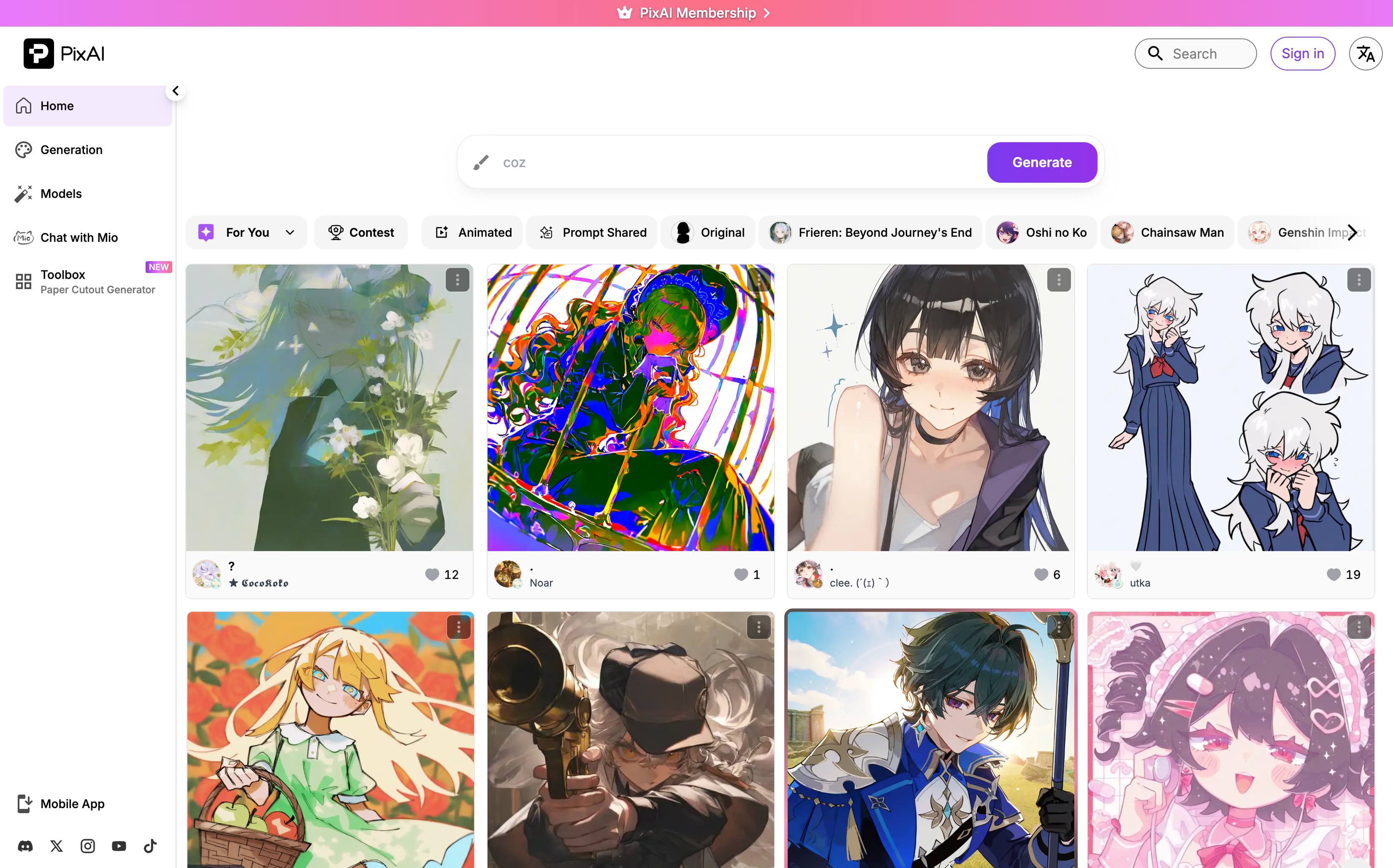
- Bring original anime characters to life with precise control using thousands of community LoRAs and in-house SDXL/DiT models
- Animate static artwork into 10-second video clips with audio support using Image-to-Video and Text-to-Video generation
- Train custom character, style, and outfit LoRAs directly in your browser without needing a local GPU or technical skills
- Edit images with professional precision using Inpaint, Outpaint, Flow Edit, and Reference Pro for multi-scene consistency
- Earn free daily credits by logging in, completing creative tasks, and participating in seasonal events and contests
- Discover new styles and prompt inspiration through the public gallery, daily rankings, and weekly community art contests
- Write prompts in your native language and have them automatically optimized for generation using the multilingual Prompt Helper
- Access the full creative toolkit on mobile with iOS and Android apps for generation, editing, and Model Market browsing
Pros & Cons
Pros
- High-quality Anime art
- Anime character templates
- Simple platform navigation
- Community features
- Discord channels for interaction
- Daily rankings
- Trending content feature
- Different style options
- Free to use
- Personalization features
- Web-based
- Examples of generated art
- Themed options (Genshin Impact, Pokemon)
- Varied poses and settings
- Supports visual content generation
- Empowers creativity
- Realistic style option
- Cyberpunk style option
- Applicable to images, photos, pictures
- In-app collaboration and inspiration
- Visibility of latest creations
- Generated art is visually compelling
- Option for various characters
- Supports user registration
- Option for image bot
- Mobile app availability
- Supports LGBT themes
Cons
- No API offered
- Limited styles themes
- No desktop application
- Limited image customization
- Lacks multi-language support
- Doesn't support batch processing
- Focuses on Anime only
- No option for image size/resolution
- Lacks offline functionality
Reviews
Rate this tool
Loading reviews...
❓ Frequently Asked Questions
PixAI_Mio
🛠️ 1 tool
wrote:PixAI (pixai.art) is an AI art platform specializing in anime and stylized digital art. It offers image generation with a wide range of models and LoRAs, image editing tools, video generation, online LoRA training, and a large creative community — all accessible from your browser or mobile app.
PixAI_Mio
🛠️ 1 tool
wrote:Yes, PixAI is free to use. Any user can access and use the Anime AI Art Generator without any cost.
PixAI_Mio
🛠️ 1 tool
wrote:Yes. The artwork you generate on PixAI belongs to you.
PixAI_Mio
🛠️ 1 tool
wrote:Yes. PixAI is available on both iOS and Android, supporting image generation, editing, and Model Market access on the go.
PixAI_Mio
🛠️ 1 tool
wrote:PixAI's Prompt Helper supports multiple languages — you can write prompts in your native language and the tool will convert them into optimized generation inputs.
PixAI_Mio
🛠️ 1 tool
wrote:Visit pixai.art, create a free account, and start generating right away. Check out the Quick Start guide on the PixAI blog for a step-by-step walkthrough.
PixAI_Mio
🛠️ 1 tool
wrote:No. PixAI is designed for all skill levels. Beginners can start by simply describing what they want in plain language. Built-in tools like Prompt Helper even let you write in your native language and automatically convert it into optimized prompts. Advanced settings are available as you grow.
PixAI_Mio
🛠️ 1 tool
wrote:Yes. You can customize characters through prompts, ControlNet for pose and composition control, LoRAs for specific character styles or identities, and editing tools like Flow Edit and Reference Pro for targeted adjustments.
PixAI_Mio
🛠️ 1 tool
wrote:PixAI offers a full creative toolkit: image generation, a suite of editing tools (Inpaint, Outpaint, Flow Edit, Reference Pro), one-click Enhance tools (Hand Fix, Face Enhance, Background Remover, Convert to Line Art, Sketch Coloring, Change Emotion), image-to-video and text-to-video generation, and online LoRA training.
PixAI_Mio
🛠️ 1 tool
wrote:The Model Market is PixAI's library of AI models, including community-created LoRAs and PixAI's own in-house models. Models are organized by character, style, pose, and outfit, making it easy to find exactly the aesthetic you're after. You can browse, combine, and even publish your own models for others to use.
PixAI_Mio
🛠️ 1 tool
wrote:PixAI supports a wide range of styles — including semi-realistic, watercolor, chibi, cyberpunk, flat illustration, and more. You can generate character illustrations, multi-character scenes, backgrounds, comic panels, sticker sheets, character concept sheets, and animated video clips.
PixAI_Mio
🛠️ 1 tool
wrote:Yes. PixAI has an active community across Discord, X (Twitter), Reddit, Instagram, and YouTube. On the platform itself, you can browse a public gallery, follow trending content, check daily rankings, and enter weekly art contests. The PixAI blog also features tutorials and guides from both the team and community creators.
PixAI_Mio
🛠️ 1 tool
wrote:Yes. PixAI features a public gallery with daily rankings that highlight the most appreciated artwork on the platform. It's a great way to discover new styles, find prompt inspiration, and keep up with what the community is creating.
PixAI_Mio
🛠️ 1 tool
wrote:PixAI supports a broad spectrum of anime art styles, including classic anime, semi-realistic, watercolor, chibi, cyberpunk, retro TV anime, Korean webtoon style, and more. The Model Market further expands this with thousands of community-created styles.
PixAI_Mio
🛠️ 1 tool
wrote:Yes. While PixAI specializes in anime-inspired art, its models and LoRAs cover a wide aesthetic range including semi-realistic portraits, cyberpunk environments, and other stylized art forms.
Pricing
Pricing model
Freemium
Paid options from
$9.99/unit
Billing frequency
Pay-as-you-go
Related Videos
PixAI Reference Pro Guide— Multi-Image Editing with Natural Language
PixAI - Anime AI Art Generator for Free•2.6K views•Jan 9, 2026