Overview
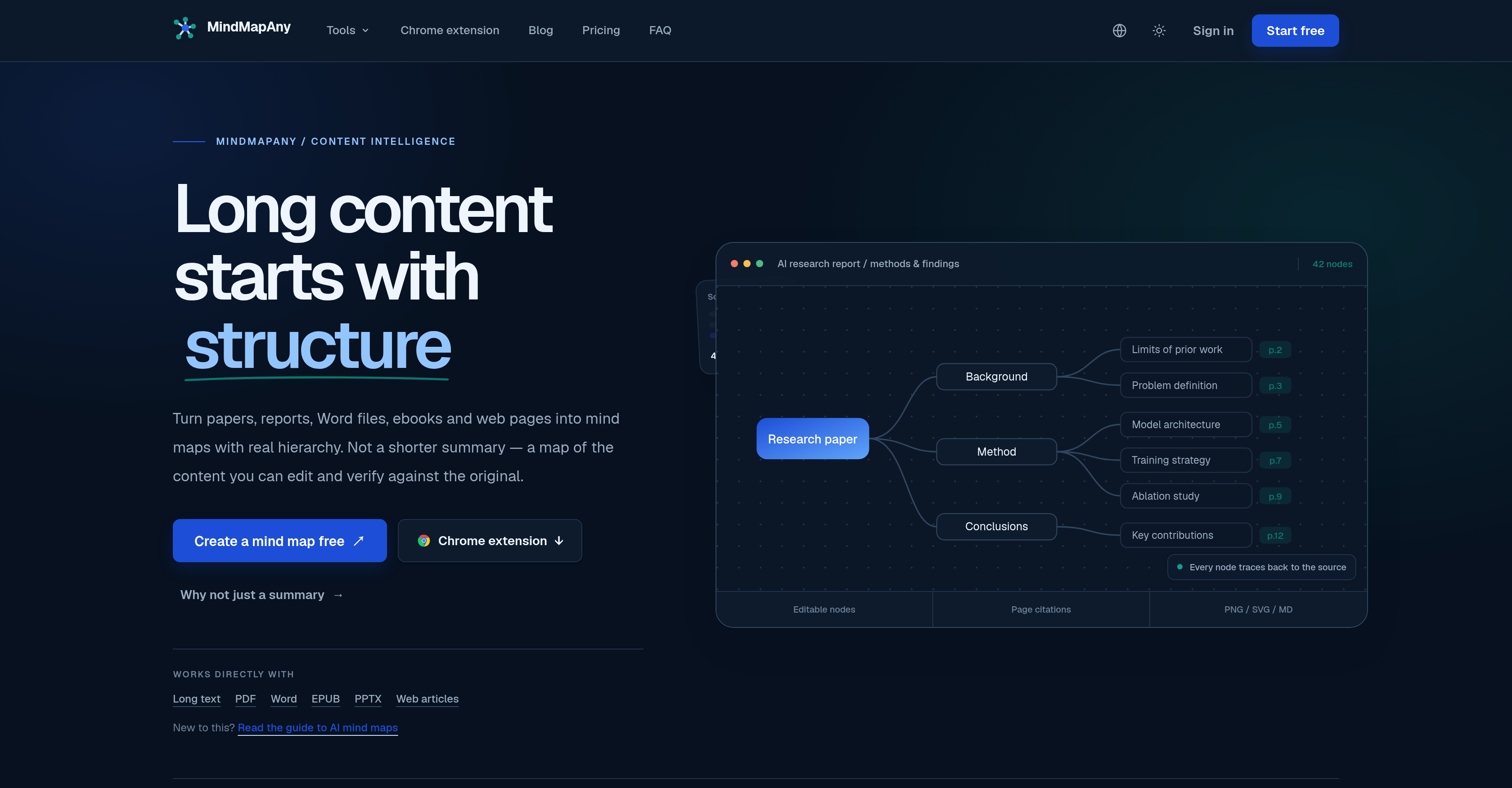
- Verify every insight instead of trusting a black box, because each mind map node carries an anchored citation that traces it back to the exact source in your PDF, Word file, or web article
- Turn 300-page reports, ebooks, and web pages into a clear hierarchical mind map in one pass, using an extraction algorithm that pulls the main points from long content and organizes them by topic
- Read a document in one language and get the mind map in another, with support for over 30 output languages during the mind mapping process
- Control how much detail you get before you start, using three depth settings that manage level and node budgets up to a maximum of 110 nodes per map
- Shape the map to your own thinking rather than accepting a fixed result, by manually fine-tuning nodes after generation
- Share a mind map as a public link or hand it off as PNG, SVG, or Markdown, so the same map works for presentations, docs, and wikis
- Start from whatever you already have, whether that is a PDF, Word document, EPUB, PPTX, web article, or text you paste in directly
- Get extraction tuned to the source itself, since the process is optimized per input type and anchors each node accordingly for accuracy and traceability
Pros & Cons
Pros
- Transforms various text formats
- Editable mind maps
- Traceable nodes
- Anchored citations
- Depth flexibility
- Supports node fine-tuning
- Modifiable maps
- Shareable maps
- Supports multiple export formats
- Over 30 output languages
- Optimized extraction process
- Supports manual content entry
- Editable final product
- 7 input formats
- Page & section anchors
- Supports 110 max nodes
- Nodes traced to source
- Multiple depth settings
- Node renaming feature
- Public link sharing
- Independent source/output languages
- PDF carries page numbers
- Word anchors to position
- EPUB carries chapter titles
- PowerPoint labels nodes with slide
- Handles long text inputs
- Handles web page inputs
- Cross-language capabilities
- Direct editing on canvas
- PNG/SVG/Markdown exporting
- User owns generated maps
- Public sharing control
- Editable post-generation
- Branch collapsing feature
- Handles TXT & Markdown inputs
- Supports 20MB files
- Bound chunking system
- Accurate chunk locations
- Extracts JavaScript pages
Cons
- Limited input formats
- 20MB file size limit
- Doesn't support scanned PDFs
- Doesn't support audio/video inputs
- Doesn't support legacy DOC files
- Requires account for use
- Node editing might be complex
- Non-interactive JavaScript renderings non-readable
- Requires manual input for mind maps
- Possibility of inaccurate node anchors
Reviews
Rate this tool
Loading reviews...
❓ Frequently Asked Questions
MindMapAny can accept textual data in various formats including PDF, Word, EPUB, PPTX, web articles and manually entered text.
Yes, MindMapAny offers multilingual functionality. It supports over 30 output languages.
MindMapAny uses an underlying algorithm and anchors to trace each node back to its source. This feature allows users to verify the original source of each piece of information on the mind map.
Users can adjust the depth of their mind map in MindMapAny through three different depth settings. This feature allows for the accommodation of different level and node budgets.
Mind maps created in MindMapAny can be exported in several formats such as PNG, SVG, and Markdown.
Yes, users can edit nodes after MindMapAny has generated the mind map. This functionality allows users to fine-tune nodes according to their specific requirements.
Yes, MindMapAny does provide sharing capabilities. Users can share the generated mind maps and even make them public if they wish.
Yes, MindMapAny does support translation in the mind mapping process. A document can be read in one language and converted into a mind map in another, given the system's support for over 30 output languages.
Using MindMapAny involves a few simple steps. Users start by uploading or pasting their content. Next, they allow MindMapAny to create the mind map. After the mind map is generated, users can edit and then export the final product.
Yes, MindMapAny is designed to transform long content pieces from documents of various types, such as reports, ebooks, or web pages into organized and editable mind maps.
Yes, MindMapAny optimizes the extraction process based on the type of input. The system anchors the nodes accordingly to ensure accuracy and traceability.
Yes, in MindMapAny, users can manually adjust and fine-tune nodes according to their requirements. This feature enhances the flexibility and usability of the mind maps created.
MindMapAny supports over 30 output languages, offering high versatility for users with different language preferences.
Yes, every node in a MindMapAny mind map can be traced back to its original source for verification. This feature is facilitated by anchored citations.
Customizable settings in MindMapAny for creating mind maps include three settings accounting for different levels of depth and node budgets. Users can also fine-tune nodes based on their specific requirements.
Yes, web articles can be used as input in MindMapAny.
MindMapAny handles long pieces of content by employing an algorithm that extracts the main points and organizes them into a hierarchical mind map.
Yes, MindMapAny handles different levels of detailing in a mind map, offering three different depth settings to provide flexibility in detailing according to user needs.
Yes, MindMapAny has the capabilities to handle both hierarchical and cognitive mapping. It creates a hierarchical representation of the main points in the input text.
Yes, in MindMapAny, there is a maximum limit of 110 nodes per map.
Pricing
Pricing model
Free Trial
Paid options from
$5.39/month
Billing frequency
Monthly