Overview

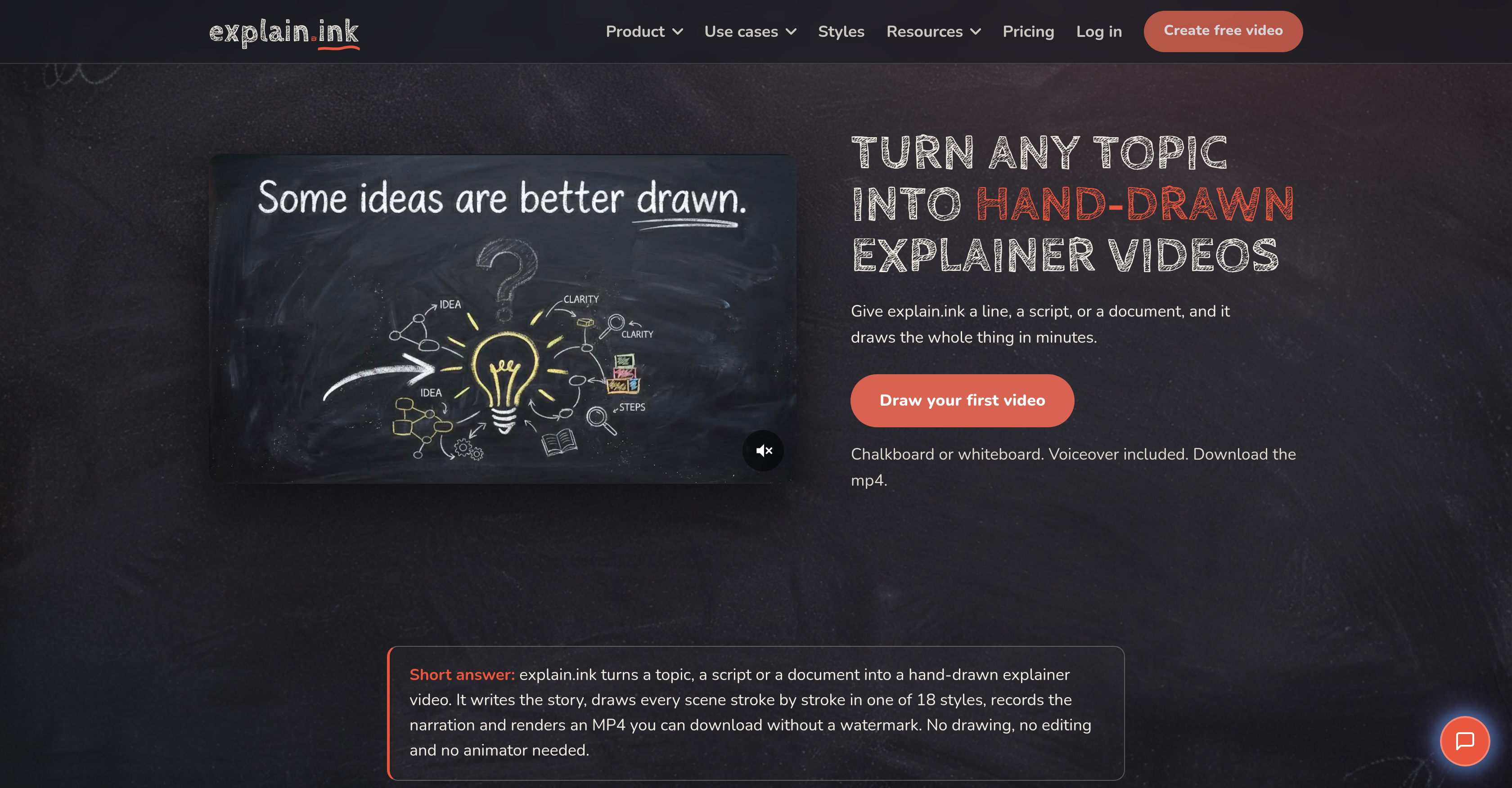
explain.ink - Screenshot showing the interface and features of this AI tool
  • Produce a complete hand-drawn explainer video in minutes, not weeks, by entering just a single line, script, or document—the AI writes the narrative, draws every scene, and records the voiceover automatically.
  • Launch same-day training, marketing, or onboarding videos by letting the AI handle script, artwork, and voiceover the moment your source text is ready.
  • Keep every word of your existing script intact with line-by-line scene matching, so your message stays exactly as written while each line gets its own drawn scene.
  • Create course-ready visual lessons that boost student engagement by converting lesson notes, documents, or PDFs into animated explainer videos with a distinct hand-drawn style.
  • Choose from 18 hand-drawn video styles—including whiteboard, colored chalk, and marker—to match your brand and audience without any drawing skills.
  • Distribute videos immediately across any platform by downloading HD MP4 files with no watermark, ready to share, upload, or embed.
  • Turn dense PDFs into concise, engaging explainer videos by uploading the document and letting the AI summarize and illustrate the key points.
  • Produce videos up to five minutes long, with the flexibility to keep them in the 1–3 minute sweet spot for maximum viewer attention.
  • Automate the entire technical production—narrative, scene design, voiceover recording, and rendering—so you never need editing software or a recording session.

Pros & Cons

Pros

  • Creates hand-drawn explainer videos
  • Writes narrative autonomously
  • Records voiceover
  • Renders video to MP4
  • Watermark-free downloads
  • Offers various video styles
  • Converts text to video
  • Turns scripts into videos
  • Processes documents into videos
  • Offers multiple use-cases
  • Useful for education
  • Effective in course creation
  • Applies in marketing
  • Simplifies onboarding
  • Effective training tool
  • Simplifies video creation
  • Promises quick turnarounds
  • Transforms topic into videos
  • Provides different art styles
  • Adjusts automatically for style
  • Preserves original wording
  • Turns PDFs into videos
  • Utilizes whiteboard animation
  • One input suffices
  • Offers a range of styles
  • Allows input style selection
  • Offers multiple input formats
  • Multiple hand-drawn styles
  • Produces HD videos
  • Turns documents nobody reads to videos
  • Translates one-liners to videos
  • Generates visuals from scripts
  • Create videos from PDFs
  • No need for drawing skills
  • No need for editing skills
  • No separate recording session
  • Retains full commercial rights
  • Videos follow same day of script
  • Voiceover matches script
  • Allows uploading of reference
  • Automatically summarizes and draws documents
  • Scenes rendered stroke by stroke
  • Allows video length selection
  • Provides subtitles with video
  • Flexible pricing options
  • Commercial rights to all assets
  • SRT and separate MP3 outputs

Cons

  • No offline functionality
  • Limited style options
  • No real-time collaboration
  • No video editing options
  • Lack of customization
  • Only renders to MP4
  • Voiceover may lack personality
  • May oversimplify complex subjects
  • No user-defined drawing patterns
  • Limited document input formats

Reviews

Rate this tool

0/2000 characters

Loading reviews...

❓ Frequently Asked Questions

explain.ink is an AI-powered tool that creates hand-drawn explainer videos from various inputs like a single line, a complete script or a document. The AI writes the narrative, hand-draws the scenes, records a voiceover, and renders the explainer video into an MP4 format that users can download without a watermark.
explain.ink uses AI technology to handle different tasks throughout the video production process. The AI writes a narrative based on the supplied text, whether it's a topic, document, PDF, or script. It then designs and hand-draws each scene in line with the narrative. The AI also records a matching voiceover, and then assembles the various components into a seamless explainer video in MP4 format.
explain.ink can convert a wide range of text sources into explainer videos. The sources can range from simply a single line or a fully written script, to more comprehensive documents, including PDF files. Regardless of the text source, explain.ink is designed to distill the core message and transform it into an engaging, hand-drawn explainer video.
When given a one-line input, explain.ink uses its AI to generate a full script and shapes a story from that one line before it begins the drawing process. This feature enables users to provide minimal input while still ending up with a comprehensive explainer video.
explain.ink uses its AI technology to record voiceovers for videos. The voiceover is automatically created by the AI to match the script of the video, meaning there is no separate recording session required, and the voiceover perfectly fits the timing and narrative of the video.
explain.ink offers 18 distinct hand-drawn styles for creating explainer videos. The styles include options like whiteboard, colored chalk, and marker among others. This range allows users to choose a style that best suits their content and resonates with their target audience.
explain.ink can autonomously convert PDF files into explainer videos. Users simply have to upload the PDF document, and the AI reads it, summarizes the contents and draws an engaging explainer video based on the summary.
Yes, explain.ink can create videos from a written script. If you already have a script written, your words are kept exactly as they are, and each line is represented with its own drawn scene in the final explainer video.
The maximum length of a video that explain.ink can produce is five minutes. However, as a recommendation most explainer videos are most effective between one and three minutes as that's the usual attention span for such content.
No, explain.ink does not leave a watermark on the videos. Users can download their final explainer videos in MP4 format without any watermark, making it easy for them to directly use, share or upload the videos as they please.
explain.ink has advanced narrative capabilities. Given even a single line or full document, it autonomously writes a coherent, engaging narrative that underpins the explainer video. The AI is designed to accommodate any topic, making it an incredibly adaptable tool for creating explainer videos.
explain.ink caters to multiple use cases, including but not limited to education, course creation, marketing, onboarding, and training. Through creating engaging explainer videos from a wide variety of text sources, the tool can facilitate better understanding, retention, and engagement across different contexts and industries.
You can download videos created with explain.ink directly from the platform. Once your explainer video is rendered, it's available for download as an MP4 file without a watermark.
The turnaround time for video production on explain.ink is very efficient and potentially can be on the same day a script is ready. The exact duration may vary based on video length, complexities involved, and the system's current workload.
explain.ink can assist in course creation by converting lesson notes or course materials into engaging, hand-drawn explainer videos. By doing so, course creators can create a visual learning experience that can increase student engagement and understanding.
There are three primary steps in creating an explainer video with explain.ink. First, you provide the input, which can be a topic, script or document. Second, explain.ink writes the narrative, draws the scenes, and records the voiceover using AI. Finally, the AI renders the explainer video into MP4 format which is ready for download.
The explainer videos from explain.ink are available for download in MP4 format. This format offers both good video quality and compatibility with most video players and platforms.
To learn more about using explain.ink effectively, there are resources available on their website including a section called 'How it works' and a blog with helpful guides and tool comparisons. These resources can provide more detailed information on creating effective explainer videos using explain.ink.
explain.ink handles the technical production of explainer videos using its AI. The AI is in charge of writing the narrative, creating the hand-drawn visuals for every scene, recording the voiceover, and rendering the final video in HD quality MP4 format.
There are several features that set explain.ink apart from other explainer video tools. Its ability to generate narratives from minimal input, the range of hand-drawn video styles on offer, the AI generated voiceover, and rapid turnaround times are significantly distinctive. In addition, the videos produced are watermark free and with no drawing skills necessary to use the tool.

Pricing

Pricing model

Free Trial

Paid options from

$5/unit

Billing frequency

Pay-as-you-go

Use tool

Top alternatives

ForthWrite logo - Alternative to explain.ink


ForthWrite

Draft emails in your authentic voice without rewriting every message—Voice Match captures your tone, sentence rhythm, and sign-offs from your real sent mail. Auto-draft replies before you even open your inbox, so you respond faster and clear your queue in seconds—automated email replies work in the background as messages arrive. Maintain your personal voice at scale across hundreds of replies—recipient-aware drafts adapt to who you are emailing, keeping each message contextually appropriate. Cut email composition time to near zero—accept a pre-written draft and send, because the AI learns from your accepted drafts to improve accuracy with every email sent. Protect your unique writing style and data with full privacy control—BYOK support lets you bring your own API key for OpenAI, Claude, Grok, and more, with encrypted, isolated training sets. Refine your email persona through data-driven iteration—Prompt Lab enables version control and A/B testing of prompts against your sent emails to optimize how closely drafts mirror your voice. Track how well drafts match your style and measure time saved—Performance Analytics shows acceptance rates and similarity scores, giving you concrete proof of personalization improvement. Start using it instantly with zero setup—works inside Gmail and Outlook on the web, adapting progressively from your first sent email without any training required. Export or wipe your training data anytime with one click—full data portability and a data wiping feature ensure you retain complete ownership of your writing profile.

Free
Knowster logo - Alternative to explain.ink

Knowster

Never lose a sale to an unanswered question—Knowster's 24/7 AI chatbot provides instant, accurate responses even during holidays and off-hours. Turn your site into a self-service knowledge base—Knowster automatically reads and re-reads your pages, so answers always reflect your latest content and updates. Deliver support in any language—Knowster's multilingual chatbot engages visitors in a seamless dialogue, removing language barriers to customer care. Stop manually typing out routine replies—Knowster generates responses directly from your existing web content, making FAQ and customer support fully automated. Capture more leads from browsing visitors—Knowster identifies purchase intent by collecting queries about price and availability, feeding your sales pipeline. Keep answers accurate without lifting a finger—Knowster integrates page changes and new content on a schedule, so your AI chatbot never falls out of date. Cover every customer question with one tool—Knowster works as an ecommerce chatbot, SaaS chatbot, or FAQ bot, handling product questions and issue resolution. Expand your knowledge base beyond web pages—Knowster pulls data from Google Drive folders, including price lists, policies, and instructions, for richer responses. Onboard in minutes, not weeks—Knowster deploys with a single line of code and takes less than five minutes to set up, with no manual response drafting required. Maintain your brand experience—Knowster's customizable widget matches your site's colors, corners, and tone, so the chatbot feels native to your design.

Free
PromptlessPress logo - Alternative to explain.ink

PromptlessPress

Launch a complete Etsy digital product listing in one session without opening design software or writing a single prompt, using a system that generates print-ready designs, lifestyle mockup photos, an SEO-written title, thirteen Etsy tags, and a full product description as one finished listing. Fill every one of Etsy's thirteen tag slots with search-friendly phrases that match how buyers actually search, instead of leaving valuable tag slots empty or using single-word tags that fail to attract traffic. Publish with total confidence that nothing goes live without your approval, because every finished listing is sent to your Etsy shop as a draft you review and publish yourself. Stay compliant with Etsy's Creativity Standards without guessing at the rules, since the tool automatically writes the AI disclosure text Etsy asks sellers to include when AI is involved in making a product. Build a catalog that avoids duplicate-listing flags, with each generation driven by your own combination of product type, visual style, and theme keyword across 400+ product types and 24 visual styles. Sell your own artwork without starting from scratch, by uploading a design you already made and having the mockups, SEO title, tags, and description built around your work rather than replacing it. Get listing photos finished at the same time as the artwork, with lifestyle mockups generated alongside each design so you never have to shoot or source product images as a separate job. Keep full control over every word and image before buyers see anything, with editable titles, tags, and descriptions in the Studio plus a second review stage once the listing lands in Etsy as a draft. Start selling digital downloads with zero design skills and no prompting to learn, choosing from 400+ product types like printables, wall art, planners, sticker sheets, greeting cards, patterns, and classroom resources. Test the entire workflow before spending anything, using a free plan with 12 monthly credits to see exactly what the tool produces for your product ideas. Scale your shop without contracts or lock-in, on month-to-month plans starting at $15 with credit allowances up to 160 per month and no commitment required. Keep everything you have already made if you cancel, since downloaded designs stay yours and the commercial licence on work made under a paid plan continues to apply.

Free
Musicfy AI logo - Alternative to explain.ink

Musicfy AI

Turn any song into a fresh AI cover while keeping the original melody intact using Musicfy AI's AI song cover generator, so you get a new vocal identity without losing the hook your audience recognizes. Generate complete, performance-ready songs from nothing more than a text prompt or lyric draft, with Musicfy AI's AI song generator handling vocals, melody, sections, and production in one pass. Hear your written lyrics come to life as a full track with composed sections, melody, and vocal phrasing built around your lines, using the AI lyrics generator paired with the AI song generator. Score any visual or narrative with original instrumental music by describing the scene, pacing, or emotion, and let Musicfy AI's scene-based instrumental creation produce a fitting soundtrack. Shape a promising idea into a finished release instead of starting over, using song refinement tools that extend tracks, split vocals and stems, and convert song parts to MIDI. Move finished music straight into video, prototype, demo, branded content, or client work, with commercial rights for generated and covered music available on paid plans. Produce new AI music tracks every day without hitting a creative wall, thanks to a daily AI song generator that turns prompts and drafts into complete songs performed by an AI song singer. Choose exactly how a cover sounds by specifying vocal direction and style and selecting a male or female vocal, then upload your own MP3 (up to 50 MB) and let Musicfy AI transform everything except the melody. Keep full control of your catalog by downloading tracks, keeping them private, and securing commercial rights on paid plans, while the free plan provides 3 generations—up to 6 songs—each day.

Free
GleanvGlean:GOVersion updatevGlean:GOAug 17, 2026Glean - What's New ✨
🎧 Rolled out an in-app podcast feature for surfacing product updates and commentary straight from the team
🤖 Added Gemini 3.7 Flash to the mix, pushing the model library past 40+ closed and open models available in-platform
📊 Dropped a benchmark against Claude Cowork on agent task economics: $0.45/task vs $1.84/task, a 4x gap driven by 2.9x lower token volume and a 1.4x cheaper blended rate. Credit goes to smart routing (Luna handling commodity steps, Opus saved for the 29% of volume where it counts) plus tighter retrieval that cuts context bloat
🎤 Locked in as a headline presence at Glean:GO 2026 (Aug 26-27, San Francisco + virtual), with co-founder Tony Gentilcore taking the stage on multi-model routing and cost control for enterprise AI stacks logo - Alternative to explain.ink

GleanvGlean:GOVersion updatevGlean:GOAug 17, 2026Glean - What's New ✨ 🎧 Rolled out an in-app podcast feature for surfacing product updates and commentary straight from the team 🤖 Added Gemini 3.7 Flash to the mix, pushing the model library past 40+ closed and open models available in-platform 📊 Dropped a benchmark against Claude Cowork on agent task economics: $0.45/task vs $1.84/task, a 4x gap driven by 2.9x lower token volume and a 1.4x cheaper blended rate. Credit goes to smart routing (Luna handling commodity steps, Opus saved for the 29% of volume where it counts) plus tighter retrieval that cuts context bloat 🎤 Locked in as a headline presence at Glean:GO 2026 (Aug 26-27, San Francisco + virtual), with co-founder Tony Gentilcore taking the stage on multi-model routing and cost control for enterprise AI stacks

Find answers from every company tool in one place with enterprise search across Slack, Google Drive, Jira, Confluence, SharePoint, GitHub and Salesforce Get responses grounded in your organization's real knowledge instead of generic training data through Glean's enterprise knowledge graph and context layer Protect sensitive information automatically with permission-aware answers that only surface data each user is already authorized to see Build and launch custom AI agents for multi-step workflows without writing code using the no-code agent builder with built-in governance Choose the right model for every task from 40+ LLMs including GPT, Gemini, Claude and Waldo through Glean's Model Hub, or bring your own API keys Cut AI costs as usage scales with token-efficient retrieval that reduces context bloat and supports smart multi-model routing Verify every response with source-referenceable answers that trace directly back to the original document or message Automate everyday work across engineering, sales, support and HR by turning fragmented company knowledge into a single place to get things done Extend Glean into existing systems with API and MCP support for custom integrations and structured data analysis

Free