ContractDecoder
Overview
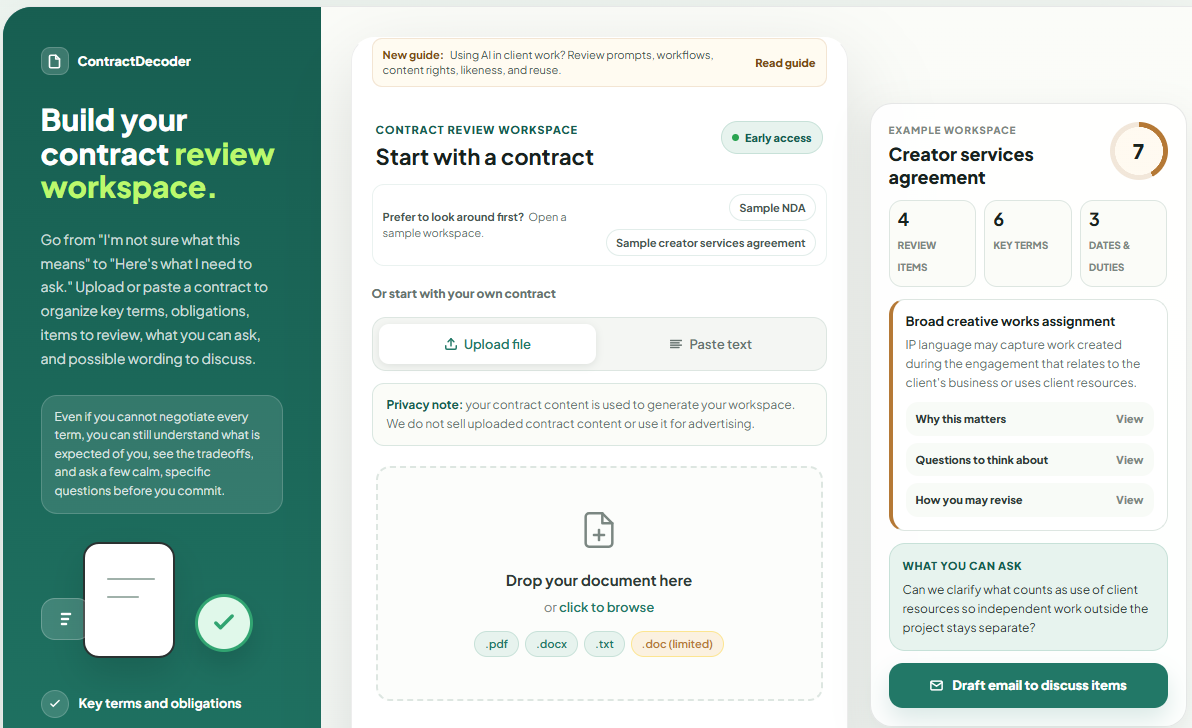
- Understand every contract instantly with plain-English summaries that decode complex legal language into clear, actionable terms
- Upload or paste agreements (PDF, DOCX, TXT, DOC) and receive an organized workspace with key terms, obligations, and deadlines identified
- Spot critical obligations and deadlines before signing with highlighted review items that flag what needs your attention
- Draft professional email responses faster using pre-written plain-English requests and example wording you can edit before sending
- Protect sensitive data by redacting confidential information before analysis, with automatic detection of common personal patterns
- Prepare for negotiations with confidence using relevant questions and discussion points generated from your specific contract terms
- Save time reviewing NDAs, service agreements, client contracts, and lease agreements without needing legal expertise upfront
- Access a complete review workspace online with no signup required, making contract analysis immediate and frictionless
Pros & Cons
Pros
- Plain-English contract interpretation
- Uploading or pasting contracts
- Organized data output
- Simplifies complex language
- Highlights important sections
- Suggests items for review
- Poses relevant questions
- Helps draft plain-English requests
- Aids in email drafting
- Doesn't misuse uploaded content
- Information security assurance
- Redacts sensitive information
- Reminder of professional consultation
- Converts confusing contracts
- Data privacy implementation
- Contract management features
- Deadline tracking
- Clear contractual obligations
- Guided sign in/sign up
- Free early access
- General information provider
- Personal Information Identifier redaction
- Example output provision
- Reviews items and questions
- Generates plain-English key terms
- Includes user-tailored discussion points
- Sensitive information detection
- Offers full-document review
- Summarizing contract features
- Provides plain-English results
- Workspace saving for users
- Saved workspaces store reviews
- Review dashboard feature
- Provides top items to review
- Draft email generation
- Key Terms Checklist
- Obligations & Deadlines checklist
- Analysis export and copying
- Workspace viewing walkthrough
- Provision of discussion preparation
- Sample workspace offerings
- Groups key terms
- ContractDecoder grouping of obligations
- Expandable details for details
- Feedback integration
Cons
- General information only, not legal advice
- Analysis may take a few minutes
- Limited to PDF, DOCX, TXT, and pasted text
Reviews
Rate this tool
Loading reviews...
❓ Frequently Asked Questions
Contract Decoder is an AI-powered tool offered by Lexplayn LLC which aids in the review of contracts. It enables users to understand contracts in plain-English, including the key terms, obligations, and deadlines. It serves as a workspace where users can upload or paste their contracts, turning the complex legal language into organized, straightforward data. However, it should be noted that Contract Decoder's output is mainly informational and is not a substitute for professional legal advice.
Contract Decoder has AI capabilities which transform complex contractual language into plain-English workspaces. It provides clarity on major points for actions or discussions by identifying key terms, obligations, deadlines, and important sections within contracts. It also suggests items for review, poses relevant questions to consider, and offers plain-English requests and example wording for discussions.
To upload or paste contracts on Contract Decoder, one needs to navigate to the Contract Decoder workspace. Here, there are options to paste the text of the contract directly or to upload a contract as a .pdf, .docx, .txt, or .doc type file. For uploading contracts, users can either click to browse or drag-and-drop their documents directly into the designated space.
Contract Decoder provides users with the option to redact sensitive parts of the documents before analysis. This is meant to ensure data privacy and protection. In case any sensitive personal information is detected in a document, Contract Decoder will recommend redaction prior to sending it for AI analysis.
No, Contract Decoder does not provide professional legal advice. While it offers valuable information and helps with the interpretation and understanding of contracts, it is not a substitute for personalized, professional legal advice. The tool emphasizes that users should consult with qualified professionals for situation-specific advice.
Contract Decoder assists users in drafting emails for contractual discussions by providing plain-English requests and example wording. Users can use these as a base, editing and personalizing as per their specific requirements, thereby streamlining communication and aiding in the discussion process.
No, Contract Decoder does not retain or misuse uploaded contractual content for advertising or selling purposes. Privacy of users' data is a priority and the tool ensures it does not exploit the uploaded content for any commercial use.
Contract Decoder assists users in understanding their legal obligations in a contract by identifying and explaining all key obligations in plain-English terms. It provides clarity on these obligations by putting them into context and posing relevant questions that users might need to consider.
Contract Decoder uses AI to analyze uploaded or pasted contracts. Once a document is uploaded or pasted into the system, the AI starts to process the language and content of the contract. It identifies key terms, obligations, important deadlines, items for review, relevant questions, and discussion points. The full-document review may take a few minutes, but the result is an organized workspace with plain-English results.
Users are able to upload commonly used file formats such as .pdf, .docx, .txt, and .doc to Contract Decoder. Additionally, they can also paste the text of contracts directly into the tool for analysis.
Yes, Contract Decoder can assist in tracking key contractual deadlines. In the process of analyzing contracts, it identifies and highlights important dates and deadline-related obligations. This information is then put into plain-English and presented in an organized manner within the user's workspace.
Contract Decoder does not store the original text of the uploaded contracts. The tool only retains the generated review result, with a focus on data privacy and protection.
Contract Decoder simplifies contractual language through its AI-based analysis. It translates complex legal jargon into plain-English, providing users with a clear, easy-to-understand terms, obligations, and deadlines. This language simplification makes it easier for the users to understand and engage with their contracts.
During the review process, Contract Decoder identifies potential points of concern and poses relevant questions for users to think about. These questions relate to the identified key terms, obligations, and deadlines, and aim to spark critical thought around the aspects and implications of the contract.
Yes, before Contract Decoder analyzes a contract, it gives users the option to redact sensitive information. The tool automatically checks for patterns of common sensitive information and recommends that these sections be redacted before the contract is sent for AI analysis.
Contract Decoder assists users in preparing plain-English contractual requests by identifying potential points for discussion or negotiation and providing example wording. This includes the plain-English translation of key terms, obligations, and deadlines, along with explanations and possible questions for each point. These can then be used as a base for writing requests or drafting discussion emails.
Contract Decoder alerts users to important sections in contracts by highlighting these sections during the review process. It flags key terms, obligations, deadlines and other significant parts of the contract, ensuring users are aware of the sections that require special attention or consideration.
The Contract Decoder workspace serves as a personalized space where users can navigate through their contractual data once it has been processed by the AI. Here, users can view key terms, obligations, items for review, questions, example wording, and discussion drafts. The workspace organizes the contract into understandable sections, providing users with a clear, concise, plain-English overview of their contract.
Contract Decoder assists with contract reviews by transforming the complex contractual language into an organized, plain-English workspace. This includes key terms, obligations, review items, relevant questions, and example wording for discussions. It flags important sections and provides a clear overview of the contract, ensuring users are armed with the necessary information before discussions or negotiations.
While Contract Decoder is a beneficial tool for understanding complex legal language in contracts, it should not be the sole source for legal advice. The software's output is informational, and while it aids in understanding contracts, it is not a substitute for professional legal advice. For specific legal advice that relates to a particular situation or contract, consulting with a legal professional is recommended.
Pricing
Pricing model
Freemium
Paid options from
$14.99/month
Billing frequency
Monthly
Refund policy
Free during early access