Overview
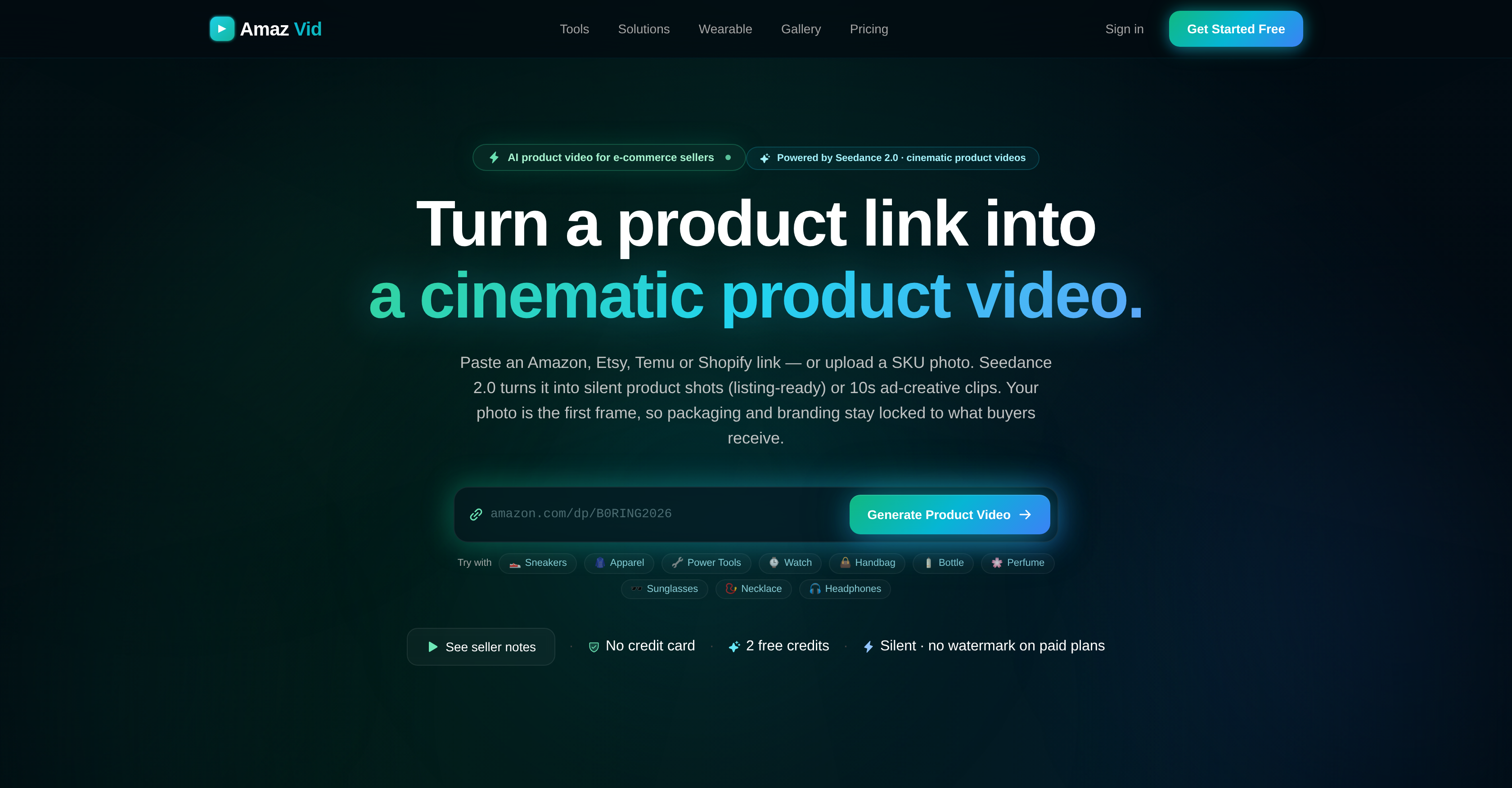
- Launch cinematic product videos in minutes without hiring freelancers by pasting a product link or uploading a photo directly into AmazVid's AI video generator
- Keep videos identical to the real product buyers receive using first-frame lock, which converts your listing photo into the opening frame of every clip
- Show buyers exactly how apparel, footwear, and eyewear look on a model with AI-generated wearable try-ons that set realistic purchase expectations
- Publish scroll-stopping 10-second ad creatives and silent product shots that replace physical product demos and speed up e-commerce purchase decisions
- Create videos for multiple products at once with batch processing for up to five SKUs, cutting the time and effort of multi-product video production
- Match every marketplace and channel with multiple output formats and ready-made templates built for consistent viewing across platforms
- Test the full AI product video workflow risk-free with two free credits and no credit card required at signup
- Deliver branded, professional videos on paid plans with no watermark added to your final exports
Pros & Cons
Pros
- Cinematic product videos
- Supports multiple platforms (Amazon, Etsy, Shopify, Temu)
- First frame lock
- Generate wearable try-ons
- Two free credits
- No credit card needed
- Various video output formats
- Batch processing for 5 SKUs
- Converts product links to videos
- Templates for video creation
- Silent product shots
- Can create ad-creative clips
- Maintains packaging and branding consistency
- Invents fashion model with products
- Efficient time and effort usage
- 360 product orbit
- Supports variety of aspect ratios
- Seedance 2.0 for video creation
- Maintains SKU identity
- URL Import
- One-click import
- Text-free, Silent clips
- Multiple modes for listings, ads, try-on
- Listing images as first frame
- Automatic title, images extraction from links
- Product shot, Ad creative, Wearable try-on modes
- Stable lighting across batch items
Cons
- Limited to five SKUs
- No voiceover capabilities
- No built-in music
- No on-screen text
- Doesn't support all marketplaces
- No edit functionality
- No free tier after credits
- Limited template selection
- No live preview feature
Reviews
Rate this tool
Loading reviews...
❓ Frequently Asked Questions
AmazVid is an Artificial Intelligence tool that assists e-commerce sellers by converting product links into cinematic product videos. It is designed to transform product images from different e-commerce platforms into silent product shots, 10-second ad-creative clips and simulate visuals of how wearable products would look when worn on a model.
AmazVid employs AI technology in various ways. It uses a feature named Seedance 2.0 which empowers users to create different types of product videos ranging from standard Product Shots to Ad creatives. It applies the first-frame lock mechanism to make videos as close as possible to the actual product. It also uses AI to simulate how wearable products would look on a model.
AmazVid extends support to several e-commerce platforms such as Amazon, Etsy, Shopify, and Temu. This means it can convert product images or product links from these platforms into cinematic product videos or silent product shots.
Yes, AmazVid indeed supports batch processing. Users can process up to five SKUs at a time, making it simpler and less time-consuming when creating videos for multiple products.
The first-frame lock feature of AmazVid is a unique attribute that ensures that the product video is as close as possible to the actual product. This feature converts users' product images into the first frame of the video, maintaining consistency between the packaging and branding displayed in the video and the actual product that buyers receive.
AmazVid uses its AI capabilities to generate Wearable try-ons. It creates a simulated visual illustrating how wearable commodities like apparel, footwear, or eyewear would look on a model. This offers potential buyers a more realistic expectation of the product.
No, a credit card is not at all required to start using AmazVid. Users are given two free credits to get started with creating their product videos.
AmazVid offers a range of output formats that fit the platform where the video will be used. These formats are useful for creating a consistent viewing experience across different platforms.
AmazVid applies its AI technology to convert product links into videos. This conversion process involves transforming product images from Amazon, Etsy, Shopify, or Temu links into silent product shots or 10-second ad-creative clips. The user's photo is adopted for the first frame, thus maintaining brand consistency in the resultant video.
Seedance 2.0 in AmazVid aids users in creating a diverse array of product videos. It empowers them to create various styles of product videos, including Product Shots and Ad creatives, using the first-frame lock, thus ensuring product consistency.
Yes, AmazVid provides a variety of templates. These are designed to offer a range of options and flexibility for users, allowing them to create videos that meet their specific needs and preferences.
Yes, AmazVid supports multiple SKUs. More specifically, it offers batch processing for up to five SKUs which can significantly cut down the time and effort spent in creating videos for multiple products.
Consistency between the actual product and its video in AmazVid is maintained by converting the user's product photo into the first frame of the video. This ensures that the packaging and branding displayed in the video are consistent with the actual product that customers receive.
The purpose of creating silent product shots or 10-second ad-creative clips in AmazVid is to offer dynamic, succinct, and impactful visuals that capably substitute for physical product interactions. It effectively aids in product demonstrations, thus facilitating the ecommerce purchase decision process.
Yes, users can convert their own uploaded photos into videos with AmazVid. This functionality allows users more freedom and flexibility in choosing and creating their product videos.
Getting started with AmazVid is quite easy. Users are not required to provide credit card details while starting, and they are given two free credits to kickstart their video creation journey.
Yes, AmazVid provides free trial options to its users. Specifically, users are given two free credits to start creating their product videos. Furthermore, they are not required to provide credit card details to utilize these free credits.
No, AmazVid does not add a watermark on videos created using paid plans. This ensures your videos retain a professional and brand-centric focus.
AmazVid allows for various types of product video creation. This includes standard Product Shots, Ad creatives, and Wearable try-ons. Each mode serves a different purpose and can be used depending on the user’s specific need.
Yes, AmazVid can produce videos for various types of products. The examples mentioned on their website range from shoes, apparel, power tools, bags, fragrances to headphones and more. Its utility traverses numerous industries and product categories.
Pricing
Pricing model
Free Trial
Paid options from
$5/month
Billing frequency
Monthly