
Album Art Creator
Overview
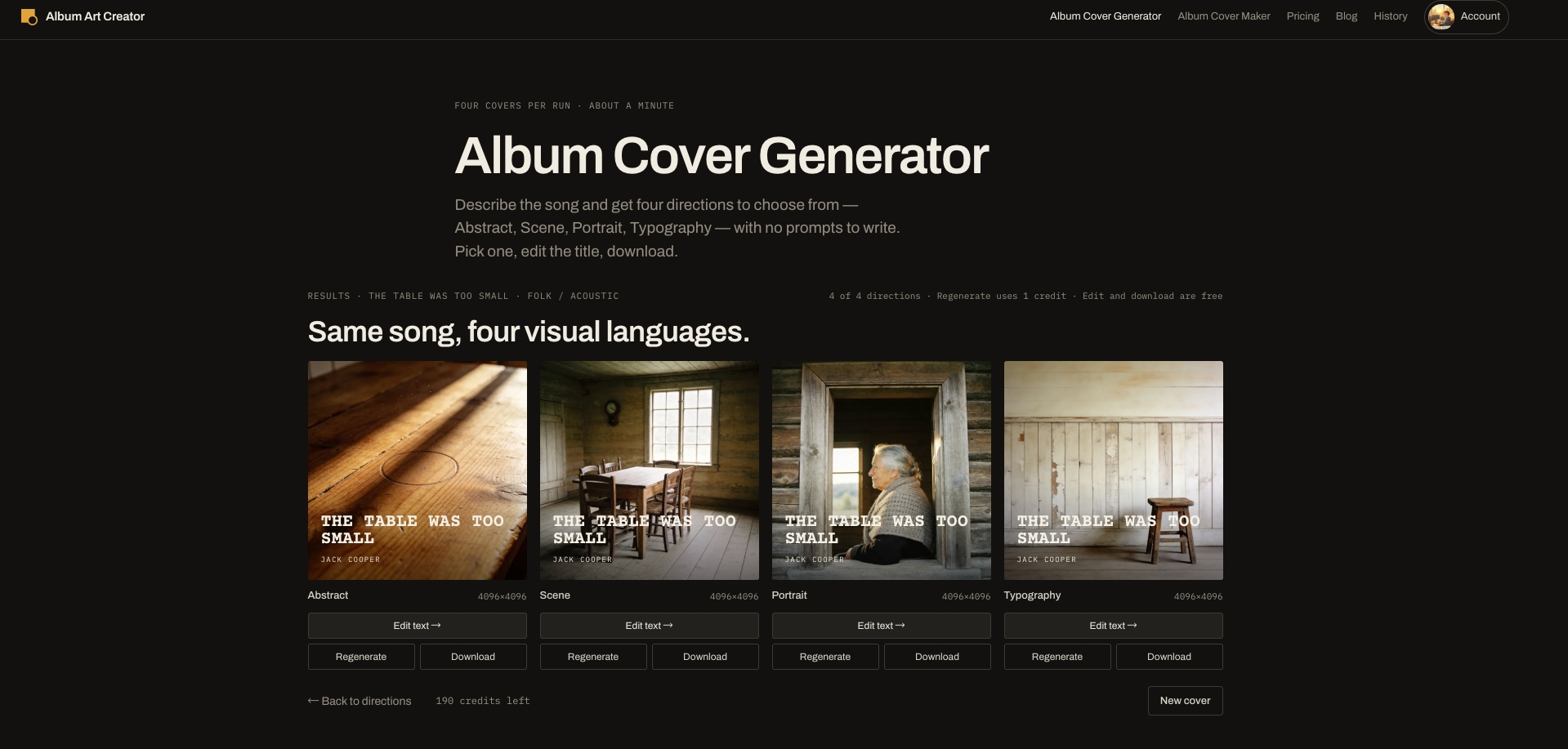
- Release a cover that passes platform review the first time with a built-in pre-flight check that compares your file against the published artwork rules of Spotify, Apple Music, DistroKid, TuneCore, CD Baby and Bandcamp for size, format, colour, file size, forbidden text and safe margin, with one-click fixes for most warnings.
- Get a cover that belongs to your song, not a generic prompt, because the genre sets materials, light, framing and font pack while the mood or lyrics you paste become concrete places and objects in four concept cards — Abstract, Scene, Portrait and Typography — and only the ones you tick render.
- Keep full control of every word on the cover with live title, artist and optional third-line text layers that are never baked into the image, so you can change font, size, colour, position, fill, stroke, backing and layout as often as you like at no credit cost.
- Match your track's exact sound with 31 genres from hip-hop, trap and drill to lo-fi, R&B, Afrobeats, indie, folk, metal, house, techno, pop and K-pop, each carrying its own visual language and matching font pack, with the genre picked automatically from Suno or Udio style tags.
- Get a photographic, non-AI look by default with film stock, natural or flash light, real places and materials, and the title set as real text rather than drawn by the model, so your cover fits a real release instead of a generated image.
- Export at the resolution each store demands with 3000 or 4096 px JPG or PNG files, including a no-text version, so Apple Music's 4000 px ask and TuneCore and CD Baby's 3000 px cap are both covered.
- Style your own photo into a release-ready cover with six film looks — black and white film, two-colour Riso, 70s Kodachrome, instant film, direct flash and warm grain — returning a 4096 px cover that keeps your face, pose and framing while only the film and light change.
- Go from title to checked file in about a minute with concept cards in seconds, a 15-second render on the free plan and 30 to 45 seconds at 4096 px on paid plans, while text edits stay instant.
- Start without an account and try three 2048 px covers free, then keep going with three a week on a free account, with no watermark on any plan and a price shown before every action that uses credits, plus failed renders refunded.
Pros & Cons
Pros
- Live layer text editing
- Supports abstract, scene, portrait, typography directions
- Pre-flight checks for DistroKid
- Quality checks against Spotify rules
- Quality checks against Apple Music rules
- No signup required
- Concept cards for inspiration
- Genre specific font packs
- Picks genre from tags
- Supports Suno, Udio songs
- Option for commercial use
- Art licensing with purchase
- Permanent history on subscription
- Concept cards for inspiration
- Failed renders are refunded
- Price shown before every action that uses credits
Cons
- No in-built image library
- No Layer Blending Options
- Limited Concept Cards Varieties
- No Collaborative Features
- Limited Font Choices
- No Gradient Text Options
- No Offline Version
- Paid Plans for High-Res Exports
- No custom color palette control
Reviews
Rate this tool
Loading reviews...
❓ Frequently Asked Questions
Jack Cooper
🛠️ 1 tool
wrote:Before anything renders, the tool writes four directions for your song — Abstract, Scene, Portrait and Typography — and shows each as a card with a one-line idea and a three-colour palette. You tick the ones you want; only those render, one credit each.
Jack Cooper
🛠️ 1 tool
wrote:Yes. The title, artist name and an optional third line are live text layers, never baked into the picture. Change font (22 fonts in genre packs), size, colour, position, fill, stroke, backing and layout as often as you like; none of it costs a credit.
Jack Cooper
🛠️ 1 tool
wrote:Yes. Editing text, changing fonts and layouts, cropping, exporting, re-exporting and switching between covers you have already rendered are all free. Only rendering a new base image uses a credit.
Jack Cooper
🛠️ 1 tool
wrote:Open the cover in the editor and click Pre-flight. It checks size, file format, colour, file size, the words on the cover, text too close to the edge and the Parental Advisory rule against the platforms you tick, and offers a one-click fix for most warnings. It cannot see whether you own the picture or whether the name matches your upload form, so a clean check lowers the risk of rejection but does not guarantee acceptance.
Jack Cooper
🛠️ 1 tool
wrote:The pre-flight check compares your file with the published artwork rules of Spotify, Apple Music, DistroKid, TuneCore, CD Baby and Bandcamp: size, shape, format, colour, file size and the text on the cover. Paid exports are 3000 or 4096 px, which covers every platform's minimum; note that Apple Music asks for 4000 while TuneCore and CD Baby cap at 3000, so those need separate exports.
Jack Cooper
🛠️ 1 tool
wrote:Yes, on Pro and credit plans. Upload a photo and pick a look — black and white film, two-colour Riso, 70s Kodachrome, instant film, direct flash or warm grain — and it returns a 4096 px cover that keeps your face, pose and framing; only the film and light change. 4 credits per look. Photos are deleted after 30 days and never used for training.
Jack Cooper
🛠️ 1 tool
wrote:The genre sets the materials, light, framing and font pack, so a country cover gets weathered wood and daylight while techno gets concrete and steel. The mood or lyrics you paste are turned into concrete places and objects for the concept cards, so the picture belongs to your song rather than to a generic prompt.
Jack Cooper
🛠️ 1 tool
wrote:31 genres, from hip-hop, trap and drill to lo-fi, R&B, Afrobeats, indie, folk, metal, house, techno, pop and K-pop. Each carries its own visual language and a matching font pack, and the genre can be picked automatically from Suno or Udio style tags.
Jack Cooper
🛠️ 1 tool
wrote:Yes. Paste the style tags and lyrics from the song page into the mood box; the genre is picked up from the tags and the lyrics shape the concepts. Note that a song made on Suno's free plan is for non-commercial use, and subscribing later does not change that.
Jack Cooper
🛠️ 1 tool
wrote:The defaults are photographic on purpose: film stock, natural or flash light, real places and materials, with the title set as real text rather than drawn by the model. The base image is generated by AI and the file may carry provenance metadata; there is no watermark on any plan.
Jack Cooper
🛠️ 1 tool
wrote:About a minute from typing the title to a checked file: the concept cards take a few seconds, a render 15 seconds on the free plan and 30 to 45 seconds at 4096 px on paid plans, and the text edits are instant.
Pricing
Pricing model
Freemium
Paid options from
$4.99/unit
Billing frequency
Pay-as-you-go
Refund policy
First Pro payment refunded in full within 7 days; unused credit packs within 14 days