AI Effect.Art | Image Generator
Overview
- Launch marketing campaigns faster by generating multiple ad creatives from a single concept without waiting for full production, using the text-to-image generator with multiple AI models.
- Refresh social media feeds with original, context-specific visuals for Instagram, YouTube, and Pinterest without relying on stock photos, through prompt-based image generation.
- Test product presentations without costly reshoots by changing backgrounds, styles, and environments on existing product photos using the image-to-image editing feature.
- Create professional website and landing page visuals that elevate brand appearance without hiring a designer, using commercial-ready images generated from text descriptions.
- Deliver more creative variations to clients with less effort by exploring different styles and concepts on existing photos through the AI image editing tool.
- Avoid recurring payments and budget surprises with a flexible pay-as-you-go credit system — credits never expire and there is no automatic renewal.
- Try the tool risk-free with trial credits before purchasing, allowing you to test the AI image generator for your specific use case without any upfront commitment.
Pros & Cons
Pros
- Flexible pay-as-you-go credits
- Credits never expire
- Trial use for free
- Text-to-image generation
- Image editing capabilities
- Generates various style visuals
- Tool for different occupations
- Useful for commercial uses
- User maintains process control
- Controls frequency of use
- Generates various application visuals
- Generates high resolution images
- Both personal and commercial use
- Transforms scenes described in text
- Produces product image variations
- Adjusts image background and composition
- Doesn't require design experience
- Straightforward, no-confusion pricing
- Creates social media content
- Creates website and page graphics
- Creates marketing campaign visuals
- Generates quality output
- Preview, download and use instantly
- Images are commercially usable
- No recurring payments necessary
- Generated images are sharp, ready-to-use
- No upscaling or fixing details needed
- Images suitable for prints
- Changes style, adjusts background
- Creates variations from one product photo
- Generation of quick visual ideas
- Accessible for marketers and creators
- Efficient creation of visuals
- No subscription service required
- Simplicity of use
- Creates a professional look
- Suitable for presentations
- Ready-to-use images
- Enables product visualization
- Generates ad visuals
- Generates website graphics
- Generates social media graphics
- Generates landing page graphics
- Generates print material visuals
- Test and iterate faster
- Improves creative workflow
- Speeds up early concept generation
- User stays in control
Cons
- No subscription option
- Pay per image
- Credits system may be confusing
- No mention of API
- Limited customization options
- Lack of collaboration tools
- No mobile app
- Limited to image generation
- No real-time preview
Reviews
Rate this tool
Loading reviews...
❓ Frequently Asked Questions
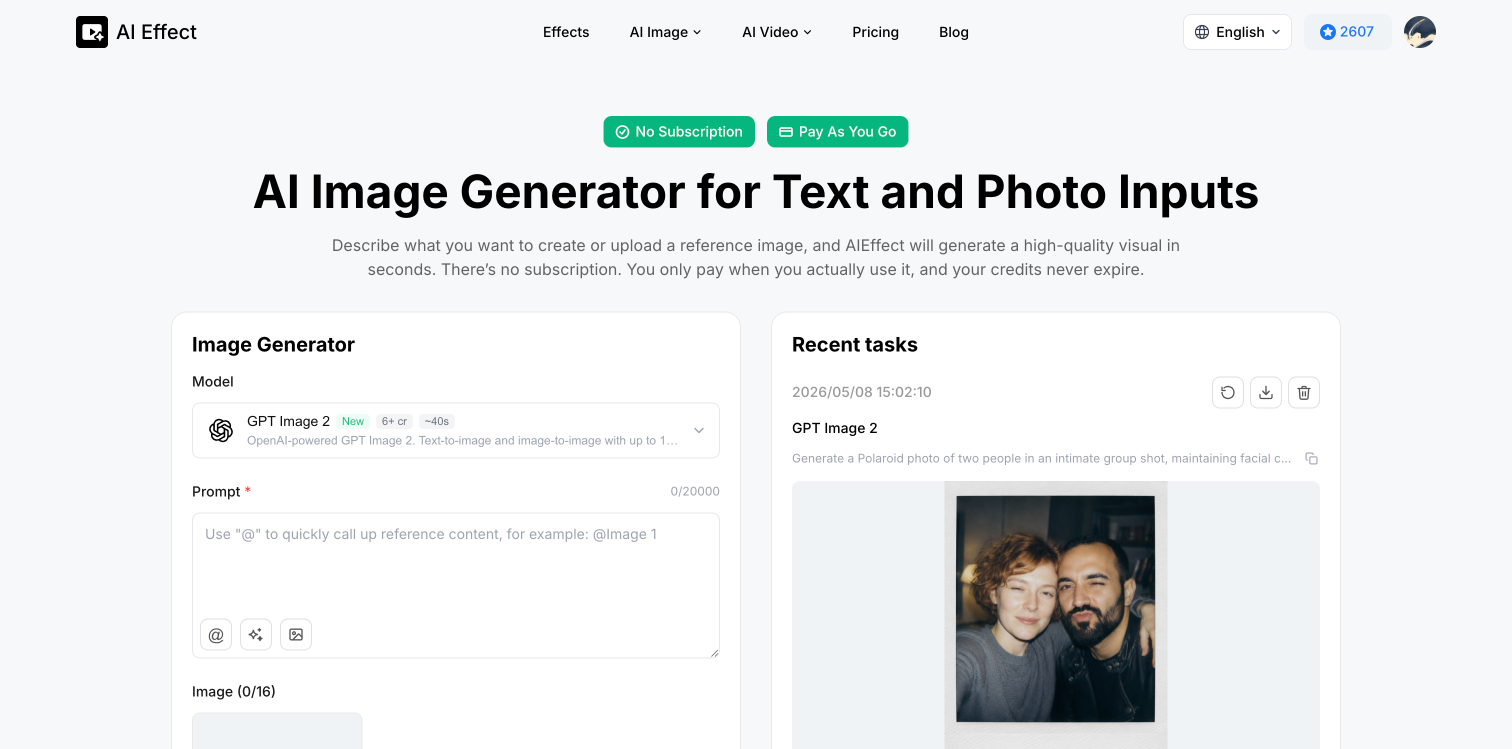
AIEffect is a freemium AI image generator that facilitates the creation of high-quality images from text descriptions or existing photos without any need for a subscription. It's a handy tool for marketing visuals, social posts, and concept ideas, and also allows users to edit existing images by adjusting their style, composition, or background. It offers a pay-per-use system where users purchase credits that don't have an expiry date and incorporate multiple leading AI models for a versatile image generation experience.
AIEffect operates by converting a text description into an image or manipulating an existing photo, depending on the user's requirements. Users can start with either a text description or an existing image. They write a description or upload an image, click generate, and let the AI process the information to get a high-resolution result, which can then be downloaded and used anywhere.
Yes, AIEffect can modify existing images. The AI allows users to feed their system with existing images and make changes to the style, composition, or background.
Yes, AIEffect can generate images from text descriptions. Users can start with a text description of a product, scene, person, or even just a mood, and the AI will generate an image that corresponds to that description. This feature is particularly useful for creating marketing visuals, social posts, and concept ideas.
AIEffect operates on a pay-per-use model. This means that users get charged only when they use the platform to generate images. Instead of a monthly subscription fee, users purchase credits, which are spent when images are created.
No, credits on AIEffect never expire. Users can make a one-time purchase and use the credits anytime without worrying about them expiring.
AIEffect is extremely versatile in terms of the AI models it hosts. It provides access to multiple leading AI models in a single platform allowing users to generate images of various styles and qualities.
AIEffect is designed for a wide range of users including social media creators, e-commerce stores, marketers, designers, and photographers looking for a platform to create high-quality visuals efficiently.
With AIEffect, users can create product images for advertisements, generate fresh content for social media, create professional-looking visuals for web pages, and produce visuals for marketing campaigns. They can also create early concept ideas, product variations and carry out creative edits on existing images.
Yes, work on AIEffect can be saved for later access. Users need to create an account to save their work and access their generated images later.
AIEffect allows social media creators to generate original images for platforms like Instagram, YouTube, and Pinterest without relying on repeated stock photos. They can swiftly produce context-specific visuals for better engagement.
E-commerce stores can use AIEffect to generate various product images without reshooting. They can change backgrounds, styles, and environments, allowing them to test product presentations without the cost of new photoshoots.
AIEffect can be utilized to improve the visual quality of websites and landing pages. With its high-quality output, users can upgrade their web pages and make their brands look more professional without having to hire a designer.
AIEffect allows marketers to move swiftly from idea to ad creative. It's ideal for testing campaigns without waiting on full production as they can generate multiple visual directions quickly from a simple concept.
Yes, AIEffect can be used to create product variations. Users can start with a single product image and turn it into multiple visuals, which allows them to test backgrounds, styles, and layouts without additional production costs.
AIEffect can indeed modify the background of an image. Users can upload an existing image and command the AI to adjust the background while keeping the core concept intact.
AIEffect is a powerful tool for creative editing. Users can explore different styles or concepts using their own photos. With less effort, they can deliver more variations and creative options to clients while keeping a unique touch to their edits.
The image quality in AIEffect is high. Images are generated in high resolution with clear details and accurate colors, making them ready to use in various applications without needing further upscaling or detail fixing.
There is no subscription requirement for using AIEffect. It works on a pay-per-use model, bypassing the need for continuous monthly fees and recurring payments.
Through AIEffect, users can create stunning visuals for their presentations. Whether it's an idea, a mood, or a concept, the AI takes the textual description and turns it into a high-resolution image, ready for use in a presentation context.
No, AIEffect does not require a subscription. It operates on a flexible pay-as-you-go credit system, with no monthly subscriptions, automatic renewal, or hidden costs.
The credit system of AIEffect operates on a pay-as-you-go basis. Users purchase credits, which are then debited as they generate images using the tool. These credits do not have an expiry date and there is no automatic renewal.
AIEffect can turn text descriptions into vivid images. Users can describe a product, scene, person, or even a mood, and AIEffect will generate a corresponding high-quality image.
AIEffect offers features such as text-to-image conversion, image editing, style changes, and image reinterpretation. Users can create variations of product visuals and make creative edits by adjusting background and composition among others.
Yes, AIEffect generates high-resolution images with clear details and accurate colors, meaning they are of high quality and are ready for use immediately after generation.
Yes, images created by AIEffect can be used for both personal and commercial purposes. There are no restrictions on their usage.
Yes, AIEffect provides trial credits for new users. These allow new users to try out the tool's functionalities for free before committing to buy more credits.
AIEffect is targeted at creators, marketers, designers, e-commerce sellers, photographers, and anyone who requires fast, AI-generated images without being obligated to a recurring plan.
Yes, AIEffect can generate social media graphics. It can generate images ideal for social posts and other social media content.
The image generation process with AIEffect involves three steps: 1. Choose your input (a description or a reference image), 2. Click on generate to let the AI process the input, 3. Preview the image, download it and use it as you need.
No, there is no design experience required to use AIEffect. The tool is user-friendly and accessible to individuals regardless of their knowledge or expertise in design.
Marketers can benefit from AIEffect in several ways. They can create attention-grabbing visuals for marketing campaigns, generate a variety of ready-to-use graphics for websites, social media, and product listings, and test marketing ideas quickly without waiting for full production.
Images generated by AIEffect can be utilized in various places like advertisements, websites, social media posts, product listings, presentations, creative projects, and print materials.
Yes, AIEffect allows users to generate images in various styles. It integrates different leading AI models to produce varying image aesthetics according to the user's needs.
No, credits for AIEffect never expire. Once purchased, they can be used anytime the user requires.
Yes, users of AIEffect maintain full control over the image creation process. They decide when and how to use the tool according to their needs.
Yes, AIEffect supports product visualization. The tool can create detailed and high-quality product visuals from user's descriptions or from existing product photos.
Yes, AIEffect can generate images suitable for print material. These images are of high resolution and are ready for both digital and print use.
The AIEffect AI models can be used by inputting a description or an image into the tool. The AI models then process the input to create a high-quality, detailed image matching the description or modulating the given image.
Pricing
Pricing model
Free Trial
Paid options from
$5/unit
Billing frequency
Pay-as-you-go
Refund policy
Refunds may be available for unused credits, duplicate charges, or payment errors. Credits already used for AI generation are non-refundable because generation costs are processed instantly through third-party AI models. Please contact support if you beli